Design Compiler 用户指南:数字逻辑综合权威教程电子书 465页

Design Compiler 用户指南:数字逻辑综合权威教程(Design Compiler User Guide 2010.03)
摘要:
本文是 Synopsys Design Compiler 2010.03 版本官方用户指南,系统讲解数字逻辑综合全流程。内容涵盖工具基础操作、设计文件准备、工艺库配置、设计环境与约束定义,详细说明时序 / 面积 / 功耗约束设置、层次化设计处理、编译策略选择与优化方法。指南重点介绍拓扑技术、ILM 接口逻辑模型、多角多模式设计支持、UPF 低功耗设计实现,以及时序违例修复、布局布线协同优化等高级功能。全书结合命令语法、实操脚本与典型案例,覆盖从 RTL 读入、综合优化、约束传导到结果输出的完整流程,为数字 IC 前端工程师提供权威、标准化的综合设计方法与工程实践指导。
Design Compiler® User Guide
Version D-2010.03-SP2, June 2010

Copyright Notice and Proprietary Information
Copyright ◎ 2010 Synopsys, Inc. All rights reserved. This software and documentation contain confidential and proprietary information that is the property of Synopsys, Inc. The software and documentation are furnished under a license agreement and may be used or copied only in accordance with the terms of the license agreement. No part of the software and documentation may be reproduced, trans mitted, or translated, in any form or by any means, electronic, mechanical, manual, optical, or otherwise, without prior written permission of Synopsys, Inc., or as expressly provided by the license agreement.
Right to Copy Documentation
The license agreement with Synopsys permits licensee to make copies of the documentation for its internal use only. Each copy shall include all copyrights, trademarks, service marks, and proprietary rights notices, if any. Licensee must assign sequential numbers to all copies. These copies shall contain the following legend on the cover page:
“This document is duplicated with the permission of Synopsys, Inc., for the exclusive use of
and its employees. This is copy number .”
Destination Control Statement
All technical data contained in this publication is subject to the export control laws of the United States of America.
Disclosure to nationals of other countries contrary to United States law is prohibited. It is the reader’s re sponsibility to determine the applicable regulations and to comply with them.
Disclaimer
SYNOPSYS, INC., AND ITS LICENSORS MAKE NO WARRANTY OF ANY KIND, EXPRESS OR IMPLIED, WITH REGARD TO THIS MATERIAL, INCLUDING, BUT NOT LIMITED TO, THE IMPLIED WARRANTIES OF
MERCHANTABILITY AND FITNESS FOR A PARTICULAR PURPOSE.
Registered Trademarks (®)
Synopsys, AMPS, Astro, Behavior Extracting Synthesis Technology, Cadabra, CATS, Certify, CHIPit, Design Compiler, DesignWare, Formality, HAPS, HDL An alyst, HSIM, HSPICE, Identify, Leda, MAST, ModelTools, NanoSim, OpenVera, PathMill, Physical Compiler, PrimeTime, SCOPE, Simply Better Results, SiVL, SNUG, SolvNet, Syndicated, Synplicity, Synplify, Synplify Pro, Synthesis Constraints Optimization Environment, TetraMAX, the Synplicity logo, UMRBus, VCS, Vera, and YIELDirector are registered trademarks of Synopsys, Inc.
Trademarks (™)
AFGen, Apollo, Astro-Rail, Astro-Xtalk, Aurora, AvanWaves, BEST, Columbia, Columbia-CE, Confirma, Cos mos,
Cos mosLE, Cos mosScope, CRITIC, CustomExplorer, CustomSim, DC Expert, DC Professional, DC Ultra, Design
Ana lyzer, Design Vision, DesignerHDL, DesignPower, DFTMAX, Direct Silicon Access, Discovery, Eclypse, Encore,
EPIC, Galaxy, Galaxy Custom Designer, HANEX, HapsTrak, HDL Compiler, Hercules, Hierarchical Optimization
Technology, High-performance ASIC Prototyping System, HSIMplus, i-Virtual Stepper, IICE, in-Sync, iN-Tandem, Jupiter, Jupiter-DP, JupiterXT, JupiterXT-ASIC, Liberty, Libra-Passport, Library Compiler, Magellan, Mars, Mars-Rail, Mars-Xtalk, Milkyway, ModelSource, Module Compiler, MultiPoint, Physical An alyst, Planet, Planet-PL, Polaris, Power Compiler,
Raphael, Saturn, Scirocco, Scirocco-i, Star-RCXT, Star-SimXT, StarRC, System Compiler, System Designer, Taurus, TotalRecall, TSUPREM-4, VCS Express, VCSi, VHDL Compiler, VirSim, and VMC are trademarks of Synopsys, Inc.
Service Marks (S M)
MAP-in, SVP Café, and TAP-in are service marks of Synopsys, Inc.
SystemC is a trademark of the Open SystemC Initiative and is used under license.
ARM and AMBA are registered trademarks of ARM Limited.
Saber is a registered trademark of SabreMark Limited Partnership and is used under license.
All other product or company names may be trademarks of their respective owners.
Preface
This preface includes the following sections:
• What’s New in This Release
• About This Manual
• Customer Support
What’s New in This Release
Information about new features, enhancements, and changes, along with known problems and limitations and resolved Synopsys Technical Action Requests (STARs), is available in the Design Compiler Release Notes in SolvNet.
To see the Design Compiler Release Notes,
1. Go to the release notes page on SolvNet located at the following address:
https://solvnet.synopsys.com/ReleaseNotes
If prompted, enter your user name and password. If you do not have a Synopsys user name and password, follow the instructions to register with SolvNet.
2. Select Design Compiler, then select a release in the list that appears at the bottom.
About This Manual
The Design Compiler User Guide provides basic synthesis information for users of the Design Compiler tools. This manual describes synthesis concepts and commands, and presents examples for basic synthesis strategies.
This manual does not cover asynchronous design, I/O pad synthesis, test synthesis, simulation, physical design techniques (such as floorplanning or place and route), or back-annotation of physical design information.
The information presented here supplements the Synopsys synthesis reference manuals but does not replace them. See other Synopsys documentation for details about topics not covered in this manual.
This manual supports version B-2008.09 of the Synopsys synthesis tools, whether they are running under the UNIX operating system or the Linux operating system. The main text of this manual describes UNIX operation.
Audience
This manual is intended for logic designers and engineers who use the Synopsys synthesis tools with the VHDL or Verilog hardware description language (HDL). Before using this
manual, you should be familiar with the following topics:
• High-level design techniques
• ASIC design principles
• Timing an alysis principles
• Functional partitioning techniques
Related Publications
For additional information about Design Compiler, see Documentation on the Web, which is available through SolvNet at the following address:
https://solvnet.synopsys.com/DocsOnWeb
You might also want to refer to the documentation for the following related Synopsys products:
• Automated Chip Synthesis
• Design Budgeting
• Design Vision
• DesignWare components
• DFT Compiler
• PrimeTime
• Power Compiler
• HDL Compiler
Also see the following related documents:
• Using Tcl With Synopsys Tools
• Synthesis Master Index
Conventions
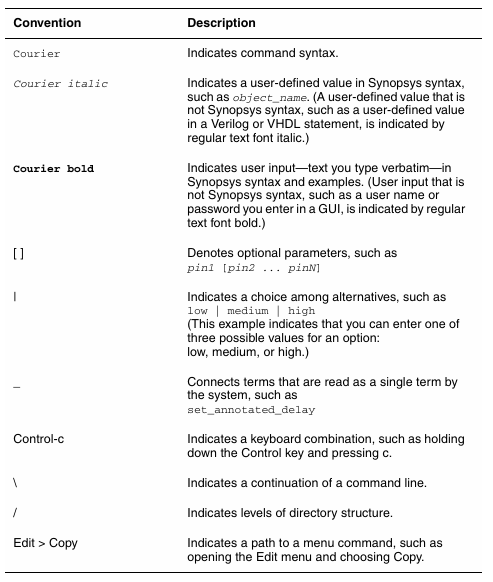
The following conventions are used in Synopsys documentation.
Customer Support
Customer support is available through SolvNet online customer support and through
contacting the Synopsys Technical Support Center.
Accessing SolvNet
SolvNet includes an electronic knowledge base of technical articles and answers to frequently asked questions about Synopsys tools. SolvNet also gives you access to a wide range of Synopsys online services including software downloads, documentation on the Web, and “Enter a Call to the Support Center.”
To access SolvNet, go to the SolvNet Web page at the following address:
If prompted, enter your user name and password. If you do not have a Synopsys user name
and password, follow the instructions to register with SolvNet.
If you need help using SolvNet, click HELP in the top-right menu bar or in the footer.
Contacting the Synopsys Technical Support Center
If you have problems, questions, or suggestions, you can contact the Synopsys Technical Support Center in the following ways:
• Open a call to your local support center from the Web by going to http://solvnet.synopsys.com (Synopsys user name and password required), and then clicking “Enter a Call to the Support Center.”
• Send an e-mail message to your local support center.
• E-mail support_center@synopsys.com from within North America.
• Find other local support center e-mail addresses at
http://www.synopsys.com/Support/GlobalSupportCenters/Pages
• Telephone your local support center.
• Call (800) 245-8005 from within the continental United States.
• Call (650) 584-4200 from Canada.
• Find other local support center telephone numbers at
http://www.synopsys.com/Support/GlobalSupportCenters/Pages
1 Introduction to Design Compiler
The Design Compiler tool is the core of the Synopsys synthesis products. Design Compiler optimizes designs to provide the s mallest and fastest logical representation of a given function. It comprises tools that synthesize your HDL designs into optimized technology-dependent, gate-level designs. It supports a wide range of flat and hierarchical design styles and can optimize both combinational and sequential designs for speed, area, and power.
This chapter includes the following sections:
• Design Compiler and the Design Flow
• Design Compiler Family
Design Compiler and the Design Flow
Figure 1-1 shows a simplified overview of how Design Compiler fits into the design flow.
Figure 1-1 Design Compiler and the Design Flow
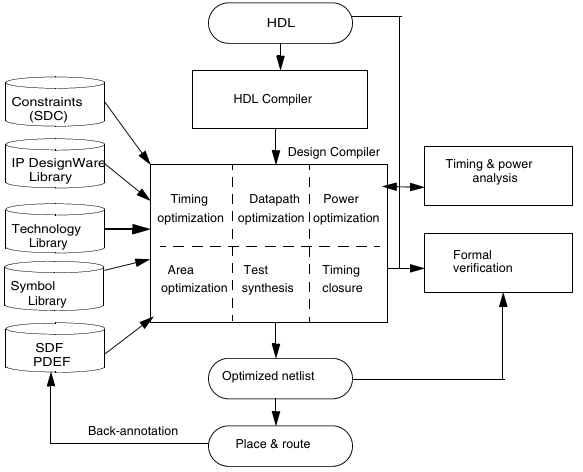
You use Design Compiler for logic synthesis, which is the process of converting a design description written in a hardware description language such as Verilog or VHDL into an optimized gate-level netlist mapped to a specific technology library. The steps in thesynthesis process are as follows:
1. The input design files for Design Compiler are often written using a hardware description language (HDL) such as Verilog or VHDL.
2. Design Compiler uses technology libraries, synthetic or DesignWare libraries, and symbol libraries to implement synthesis and to display synthesis results graphically. During the synthesis process, Design Compiler translates the HDL description to components extracted from the generic technology (GTECH) library and DesignWare library. The GTECH library consists of basic logic gates and flip-flops. The DesignWare library contains more complex cells such as adders and comparators. Both the GTECH and DesignWare libraries are technology independent, that is, they are not mapped to a specific technology library. Design Compiler uses the symbol library to generate the design schematic.
3. After translating the HDL description to gates, Design Compiler optimizes and maps the design to a specific technology library, known as the target library. The process is constraint driven. Constraints are the designer’s specification of timing and environmental restrictions under which synthesis is to be performed.
4. After the design is optimized, it is ready for test synthesis. Test synthesis is the process by which designers can integrate test logic into a design during logic synthesis. Test synthesis enables designers to ensure that a design is testable and resolve any test issues early in the design cycle.
The result of the logic synthesis process is an optimized gate-level netlist, which is a list of circuit elements and their interconnections.
5. After test synthesis, the design is ready for the place and route tools, which place and interconnect cells in the design. Based on the physical routing, the designer can
back-annotate the design with actual interconnect delays; Design Compiler can then resynthesize the design for more accurate timing an alysis.
Design Compiler Family
Synopsys provides an integrated RTL synthesis solution. Using Design Compiler tools, you can
• Produce fast, area-efficient ASIC designs by employing user-specified gate-array, FPGA, or standard-cell libraries
• Translate designs from one technology to another
• Explore design tradeoffs involving design constraints such as timing, area, and power under various loading, temperature, and voltage conditions
• Synthesize and optimize finite state machines
• Integrate netlist inputs and netlist or schematic outputs into third-party environments while still supporting delay information and place and route constraints
• Create and partition hierarchical schematics automatically
DC Expert
At the core of the Synopsys’ RTL synthesis solution is the DC Expert. DC Expert is applied to high-performance ASIC and IC designs.
DC Expert provides the following features:
• Hierarchical compile (top down or bottom up)
• Full and incremental compile techniques
• Sequential optimization for complex flip-flops and latches
• Time borrowing for latch-based designs
• Timing an alysis
• Buffer balancing (within hierarchical blocks)
• Command-line interface and graphical user interface
• Budgeting, the process of allocating timing and environment constraints among blocks in a design
• Automated chip synthesis, a set of Design Compiler commands that fully automate the partitioning, budgeting, and distributed synthesis flow for large designs
DC Ultra
The DC Ultra tool is applied to high-performance deep submicron ASIC and IC designs, where maximum control over the optimization process is required.
In addition to the DC Expert capabilities, DC Ultra provides the following features:
• Additional high-effort delay optimization algorithms
• Advanced arithmetic optimization
• Integrated datapath partitioning and synthesis capabilities
• Finite state machine (FS M) optimization
• Advanced critical path resynthesis
• Register retiming, the process by which the tool moves registers through combinational gates to improve timing
• Support for advanced cell modeling, that is, the cell-degradation design rule
• Advanced timing an alysis
HDL Compiler Tools
The HDL compiler reads HDL files and performs translation and architectural optimization of the designs. For more information about the HDL Compiler tools, see the HDL Compiler documentation.
DesignWare Library
A DesignWare library is a collection of reusable circuit-design building blocks (components) that are tightly integrated into the Synopsys synthesis environment. During synthesis, Design Compiler selects the right component with the best speed and area optimization from the DesignWare Library. For more information, see the DesignWare Library documentation.
DFT Compiler
The DFT Compiler tool is the Synopsys test synthesis solution. DFT Compiler provides integrated design-for-test capabilities, including constraint-driven scan insertion during compile. The DFT Compiler tool is applied to high-performance ASIC and IC designs that utilize scan test techniques. For more information, see the DFT Compiler documentation.
Power Compiler
The Power Compiler tool offers a complete methodology for power, including an alyzing and optimizing designs for static and dynamic power consumption. For more information about these power capabilities, see the Power Compiler User Guide.
Design Vision
The Design Vision tool is a graphical user interface (GUI) to the Synopsys synthesis environment and an an alysis tool for viewing and an alyzing designs at the generic technology (GTECH) level and gate level. Design Vision provides menus and dialog boxes for implementing Design Compiler commands. It also provides graphical displays, such as design schematics. For more information, see the Design Vision User Guide and Design Vision Help.
更多内容见附件
免责声明:
本页面/内容部分素材来源于互联网公 开 信 息,旨在传递更多信息,不代表本平台立场。
版权归原作者或机构所有,如涉及侵权,请通过平台联系我们,我们将在核实后第一时间处理。
本平台对转载内容的真实性、准确性不作任何保证,用户需自行判断并承担使用风险。