开源线弹性静力小变形UEL子程序分享

零
概述

分享一个适用于线弹性静力小变形的UEL子程序,程序来源于github,地址为(也可私信我获取全部程序)
https://github.com/bibekanandadatta/Abaqus-UEL-Elasticity该UEL可计算的单元类型有
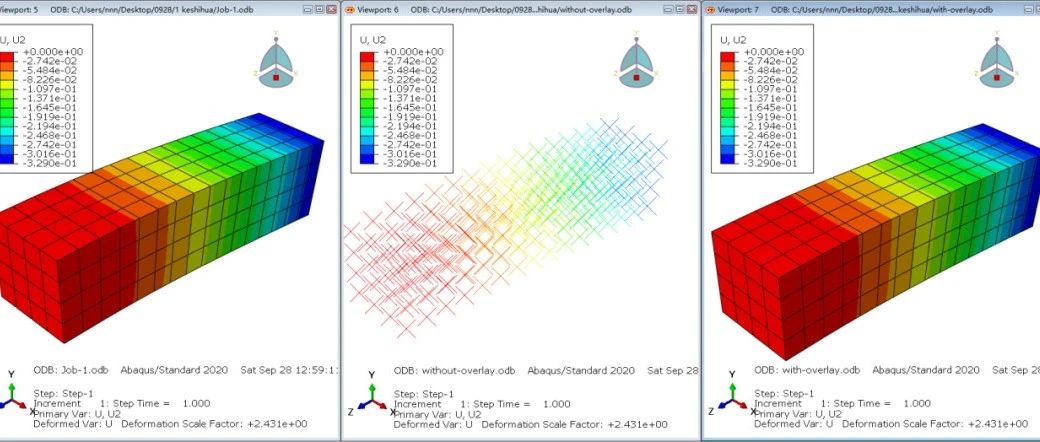
CPE4 C3D8 C3D20 CPE6 CPE8该程序采用UVARM子程序给用户自定义单元进行可视化。在计算之前首先在自定义单元的初始位置嵌套一层abaqus自带的单元,并且将材料属性设置为无限小,因此嵌套的单元对模型的刚度无贡献,在UEL中计算单元应变和应力,并传递参数到UVARM子程序中。
壹
程序结构讲解
采用Fortran完成所有的程序设计,主程序为
uel_mech其余的功能采用fortran的module进行封装,供主程序调用,该程序编写的module有
global_parameters.forerror_logging.forlinear_algebra.forlagrange_element.forgauss_quadrature.forsolid_mechanics.forpost_processing.formode.for
在主程序中,需要采用include引用上述module,具体的引用代码为
include 'global_parameters.for' ! global parameters moduleinclude 'error_logging.for' ! error/ debugging moduleinclude 'linear_algebra.for' ! linear algebra moduleinclude 'lagrange_element.for' ! Lagrange element moduleinclude 'gauss_quadrature.for' ! Guassian quadrature moduleinclude 'solid_mechanics.for' ! solid mechanics moduleinclude 'post_processing.for' ! post-processing moduleinclude 'mode.for'
程序内部涉及到线性代数的矩阵运算,因此Fortran需要调用mkl计算库,程序提供了env文件,用于程序运行时调用mkl计算库,env文件中的内容为
compile_fortran += ['/Qmkl:sequential']主程序中的uel程序用于向abaqus主程序返回刚度矩阵和右端量等,具体程序为
! **********************************************************************! ****************** ABAQUS USER ELEMENT SUBROUTINE ********************! **********************************************************************! make sure to have the correct directoryinclude 'global_parameters.for' ! global parameters moduleinclude 'error_logging.for' ! error/ debugging moduleinclude 'linear_algebra.for' ! linear algebra moduleinclude 'lagrange_element.for' ! Lagrange element moduleinclude 'gauss_quadrature.for' ! Guassian quadrature moduleinclude 'solid_mechanics.for' ! solid mechanics moduleinclude 'post_processing.for' ! post-processing moduleinclude 'mode.for'SUBROUTINE UEL(RHS,AMATRX,SVARS,ENERGY,NDOFEL,NRHS,NSVARS,& PROPS,NPROPS,COORDS,MCRD,NNODE,Uall,DUall,Vel,Accn,JTYPE,TIME,& DTIME,KSTEP,KINC,JELEM,PARAMS,NDLOAD,JDLTYP,ADLMAG,PREDEF,& NPREDF,LFLAGS,MLVARX,DDLMAG,MDLOAD,PNEWDT,JPROPS,NJPROPS,PERIOD)! This subroutine is called by Abaqus with above arguments! for each user elements defined in an Abaqus model. Users are! responsible for programming the element tangent/ stiffness! matrix and residual vectors which will be then assembled and! solved by Abaqus after applying the boundary conditions.use global_parametersuse error_logginguse user_elementuse post_processingINCLUDE 'ABA_PARAM.INC'DIMENSION RHS(MLVARX,*),AMATRX(NDOFEL,NDOFEL),PROPS(*),& SVARS(*),ENERGY(8),COORDS(MCRD,NNODE),UAll(NDOFEL),& DUAll(MLVARX,*),Vel(NDOFEL),Accn(NDOFEL),TIME(2),PARAMS(*),& JDLTYP(MDLOAD,*),ADLMAG(MDLOAD,*),DDLMAG(MDLOAD,*),& PREDEF(2,NPREDF,NNODE),LFLAGS(*),JPROPS(*)! user coding to define RHS, AMATRX, SVARS, ENERGY, and PNEWDTinteger, intent(in) :: NDOFEL, NRHS, NSVARS, NPROPS, MCRDinteger, intent(in) :: NNODE, JTYPE, KSTEP, KINC, JELEMinteger, intent(in) :: NDLOAD, JDLTYP, NPREDF, LFLAGSinteger, intent(in) :: MLVARX, MDLOAD, JPROPS, NJPROPSreal(wp), intent(in) :: PROPS, COORDS, DUall, Uall, Vel, Accnreal(wp), intent(in) :: TIME, DTIME, PARAMS, ADLMAG, PREDEFreal(wp), intent(in) :: DDLMAG, PERIODreal(wp), intent(out) :: RHS, AMATRXreal(wp), intent(out), optional :: SVARS, ENERGY, PNEWDTcharacter(len=8) :: abqProcedureinteger :: nDim, nStresscharacter(len=2) :: analysislogical :: nlgeominteger :: nInt, nPostVarsinteger :: lenJobName,lenOutDircharacter(len=256) :: outDircharacter(len=256) :: jobNamecharacter(len=512) :: errFile, dbgFiletype(logger) :: msg! initialize the output variables to be defined for Abaqus subroutineenergy = zeroamatrx = zerorhs(:,nrhs) = zero! Open an error and debug file for the current job.! See Abaqus documentation for Fortran unit number.! File unit numbers are defined in the error_logging module.call getJobName(jobName,lenJobName)call getOutDir(outDir,lenOutDir)errFile = trim(outDir)//'\aaERR_'//trim(jobName)//'.dat'dbgFile = trim(outDir)//'\aaDBG_'//trim(jobName)//'.dat'call msg%fopen( errfile=errFile, dbgfile=dbgFile )! change the LFLAGS criteria as needed (check Abaqus UEL manual)if( (lflags(1) .eq. 1) .or. (lflags(1) .eq. 2) ) thenabqProcedure = 'STATIC'elsecall msg%ferror(flag=error, src='UEL',& msg='Incorrect Abaqus procedure.', ia=lflags(1))call xitend if! check if the procedure is linear or nonlinearif (lflags(2) .eq. 0) thennlgeom = .false.else if (lflags(2) .eq. 1) thennlgeom = .true.end if! check to see if it's a general step or a linear purturbation stepif(lflags(4) .eq. 1) thencall msg%ferror(flag=error, src='UEL',& msg='The step should be a GENERAL step.', ia=lflags(4))call xitend if! set parameters specific to analysis and element typesif ((jtype .ge. 1).and.(jtype .le. 4)) then ! three-dimensional analysisnDim = 3analysis = '3D'nStress = 6else if ((jtype .ge. 5).and.(jtype .le. 8)) then ! plane strain analysisnDim = 2analysis = 'PE'nStress = 3else if ((jtype .ge. 9).and.(jtype .le. 12)) then ! plane stress analysisnDim = 2analysis = 'PS'nStress = 3else if ((jtype .ge. 13).and.(jtype .le. 16)) then ! axisymmetric analysis! CAUTION: axisymmetric elements are not validated yetnDim = 2analysis = 'AX'nStress = 4elsecall msg%ferror( flag=error, src='UEL',& msg='Element is unavailable.', ia=jtype )call xitend ifnInt = jprops(1)nPostVars = jprops(2)! array containing variables for post-processingif (.not. allocated(globalPostVars)) thenallocate( globalPostVars(numElem,nInt,nPostVars) )! print job-related information the first timecall msg%finfo('---------------------------------------')call msg%finfo('------- Abaqus SMALL STRAIN UEL -------')call msg%finfo('--------- SOURCE: uel_mech.for --------')call msg%finfo('---------------------------------------')call msg%finfo('--- Abaqus Job: ', ch=trim(jobName))call msg%finfo('---------------------------------------')call msg%finfo('------- PROCEDURE = ', ch=abqProcedure)call msg%finfo('------- ANALYSIS TYPE = ', ch=analysis)call msg%finfo('---------- NLGEOM = ', la=nlgeom)call msg%finfo('------- MODEL DIMENSION = ', ia=nDim)call msg%finfo('------- ELEMENT NODES = ', ia=nNode)call msg%finfo('---------------------------------------')call msg%finfo('-------- INTEGRATION SCHEME -----------')call msg%finfo('----------- NINT = ', ia=nInt)call msg%finfo('---------------------------------------')call msg%finfo('---------- POST-PROCESSING ------------')call msg%finfo('--- NO OF ELEMENTS = ',ia=numElem)call msg%finfo('--- OVERLAY ELEMENT OFFSET = ',ia=elemOffset)call msg%finfo('--- NO OF VARIABLES AT INT PT = ',ia=nPostVars)call msg%finfo('---------------------------------------')end if! call the element subroutine with extended input argumentscall uelMech(RHS,AMATRX,SVARS,ENERGY,NDOFEL,NRHS,NSVARS,& PROPS,NPROPS,COORDS,MCRD,NNODE,Uall,DUall,Vel,Accn,JTYPE,TIME,& DTIME,KSTEP,KINC,JELEM,PARAMS,NDLOAD,JDLTYP,ADLMAG,PREDEF,& NPREDF,LFLAGS,MLVARX,DDLMAG,MDLOAD,PNEWDT,JPROPS,NJPROPS,PERIOD,& NDIM,ANALYSIS,NSTRESS,NINT)END SUBROUTINE UEL
主程序中UVARM用于给用户自定义单元可视化,具体代码为
! **********************************************************************! ************** ABAQUS USER OUTPUT VARIABLES SUBROUTINE ***************! **********************************************************************SUBROUTINE UVARM(UVAR,DIRECT,T,TIME,DTIME,CMNAME,ORNAME,& NUVARM,NOEL,NPT,LAYER,KSPT,KSTEP,KINC,NDI,NSHR,COORD,& JMAC,JMATYP,MATLAYO,LACCFLA)! This subroutine is called by Abaqus at each material point (int pt)! to obtain the user defined output variables for standard Abaqus! elements. We used an additional layer of standard Abaqus elements! with same topology (same number of nodes and int pts) on top of! the user elements with an offset in the numbering between the user! elements and standard elements. This number is defined in the! post_processing module and should match with Abaqus input file.use global_parametersuse post_processingINCLUDE 'ABA_PARAM.INC'CHARACTER*80 CMNAME,ORNAMECHARACTER*3 FLGRAY(15)DIMENSION UVAR(NUVARM),DIRECT(3,3),T(3,3),TIME(2)DIMENSION ARRAY(15),JARRAY(15),JMAC(*),JMATYP(*),COORD(*)! the dimensions of the variables FLGRAY, ARRAY and JARRAY! must be set equal to or greater than 15.! explicityly define the type for uvar to avoid issuesreal(wp) :: uvar! assign the stored global variables to the UVAR for Abaqus to processuvar(1:nuvarm) = globalPostVars(noel-elemOffset,npt,1:nuvarm)END SUBROUTINE UVARM! **********************************************************************! **********************************************************************
为验证程序,提供了一系列的inp文件
cantilever_U7_CPE4_elem_80_elastic.inpsingle_elem_uniaxial_U3_C3D8_elastic.inpsingle_elem_uniaxial_U4_C3D20_elastic.inpsingle_elem_uniaxial_U5_CPE3_elastic.inpsingle_elem_uniaxial_U6_CPE6_elastic.inpsingle_elem_uniaxial_U7_CPE4_elastic.inpsingle_elem_uniaxial_U8_CPE8_elastic.inp
这里以最后一个inp文件为例,简要讲解inp文件中的修改
*Heading** abaqus/ standard input file for uniaxial test of** single CPE8 (U8) type element for uel_mech.for**节点坐标信息*Node1, 0., 0....****************************************************用户自定义单元信息*User Element,Type1,2*Element, type=U81, 1, 2, 4, 3, 5, 6, 7, 8***************************************************Nset, nset=All, generate1, 8, 1*Elset, elset=All1,*Nset, nset=Bottom1, 2, 5*Elset, elset=Bottom1,*Nset, nset=Left1, 3, 8*Elset, elset=Left1,*Nset, nset=Right, generate2, 6, 2*Elset, elset=Right1,*Nset, nset=Top3, 4, 7*Elset, elset=Top1,****************************************************给用户自定义单元赋予属性*uel property,elset=all** E, nu, nInt, nPostVars79E9, 0.3, 9, 6**************************************************** same element connectivity as the user element** uses built-in abaqus element to overlay results** negligible young's modulus won't affect the result**嵌套的一层abaqus自带的单元用于可视化*Element, type=CPE8100001, 1, 2, 4, 3, 5, 6, 7, 8*Elset, elset=elDummy100001*Solid section, elset=elDummy, material=Dummy**给嵌套的一层单元赋予材料属性,无限小的材料属性*Material, name=Dummy*Elastic1.e-20** strain vector (3) and stress vector (3) as user output**UVARM子程序用于可视化*User output variables6****************************************************给左边界和底边界固定住*BoundaryLeft, 1, 1Bottom, 2, 2****************************************************定义幅值曲线*Amplitude, name=LinearRamp0., 0., 1., 1.***************************************************Step, name=Stretch, nlgeom=NO, inc=1000**静力分析步*Static1, 1, 0.001, 1*给右边界施加力*Boundary, amplitude=LinearRampRight, 1, 1, 0.01*Restart, write, frequency=0*Output, field, frequency=1, time marks=no*node output, nset=Allu,rf** specify the user-defined output for the dummy element set*element output, elset=elDummyuvarm*End Step**************************************************
贰
算例
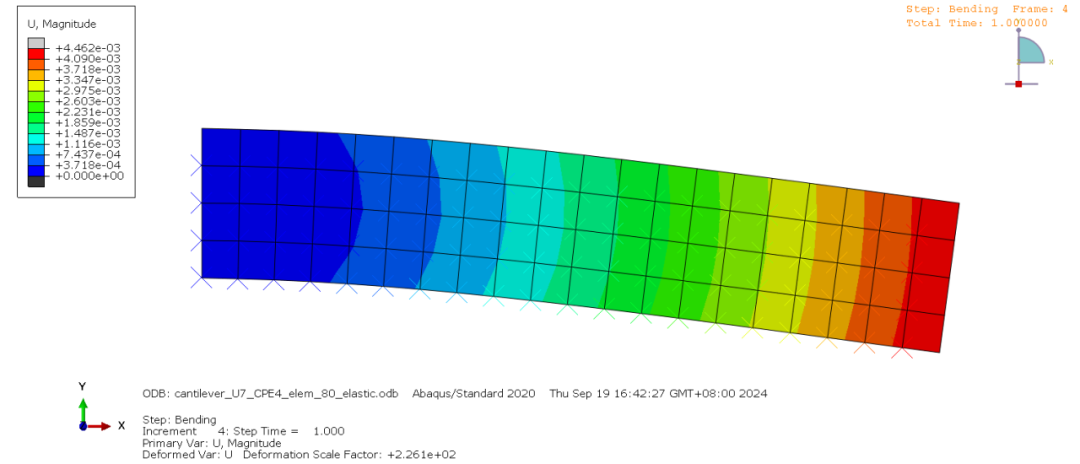
下面以cantilever_U7_CPE4_elem_80_elastic为例运行子程序,直接采用bat文件运行文件,bat文件为
call abaqus job=cantilever_U7_CPE4_elem_80_elastic user=uel_mech cpus=10 intpause
程序运行结束后,cmd窗口中会输出
---------------------------------------------- Abaqus SMALL STRAIN UEL ---------------- SOURCE: uel_mech.for -------------------------------------------------- Abaqus Job: single_elem_uniaxial_U7_CPE4_elastic---------------------------------------------- PROCEDURE = STATIC------- ANALYSIS TYPE = PE---------- NLGEOM = F------- MODEL DIMENSION = 2------- ELEMENT NODES = 4----------------------------------------------- INTEGRATION SCHEME ---------------------- NINT = 4------------------------------------------------- POST-PROCESSING --------------- NO OF ELEMENTS = 50000--- OVERLAY ELEMENT OFFSET = 100000--- NO OF VARIABLES AT INT PT = 6---------------------------------------
这是uel子程序中编写的输出语句,用于监测程序的运行过程
最终未变形的odb文件在cae中显示为

可以发现,在正常的节点位置出现了“XXX”形状的图形,这些是用户自定义单元,如果不采用可视化技术,界面中就只有这些“XX”形状的图形。
位移数值(magnitude)云图为
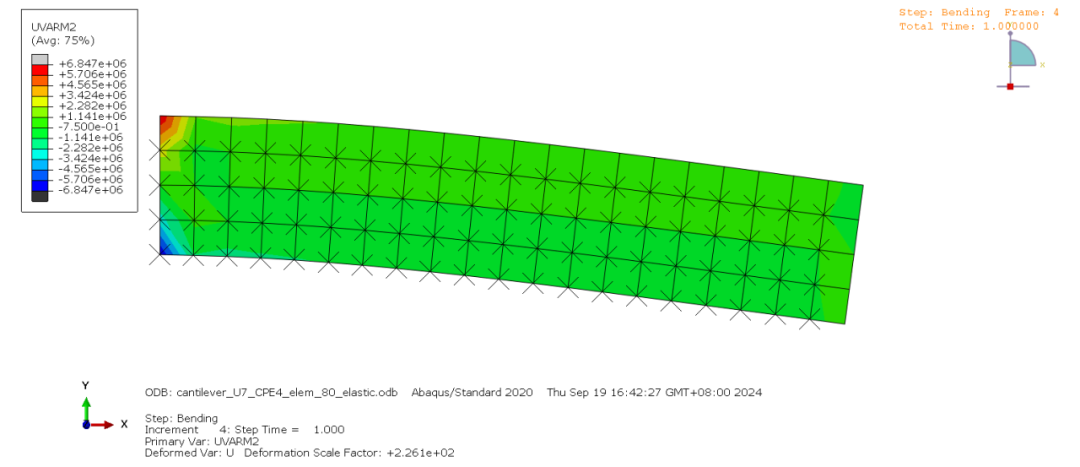
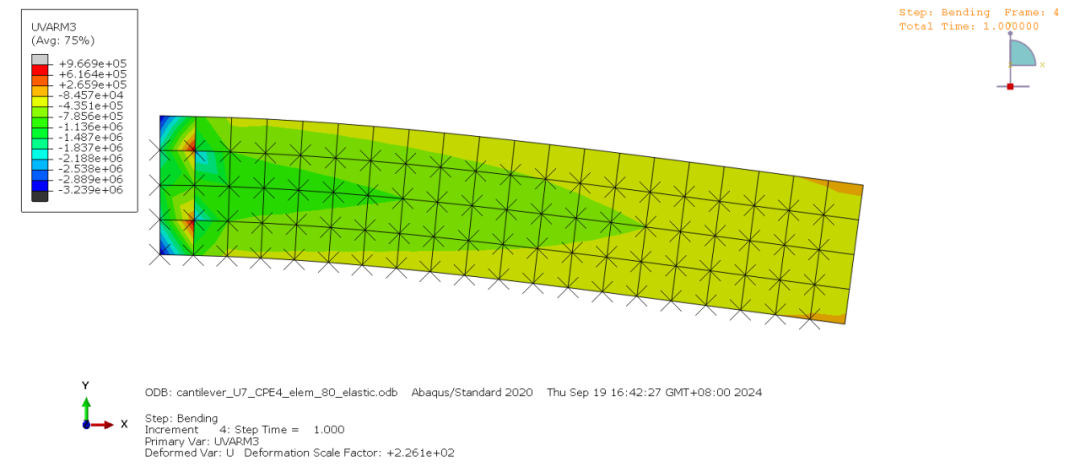
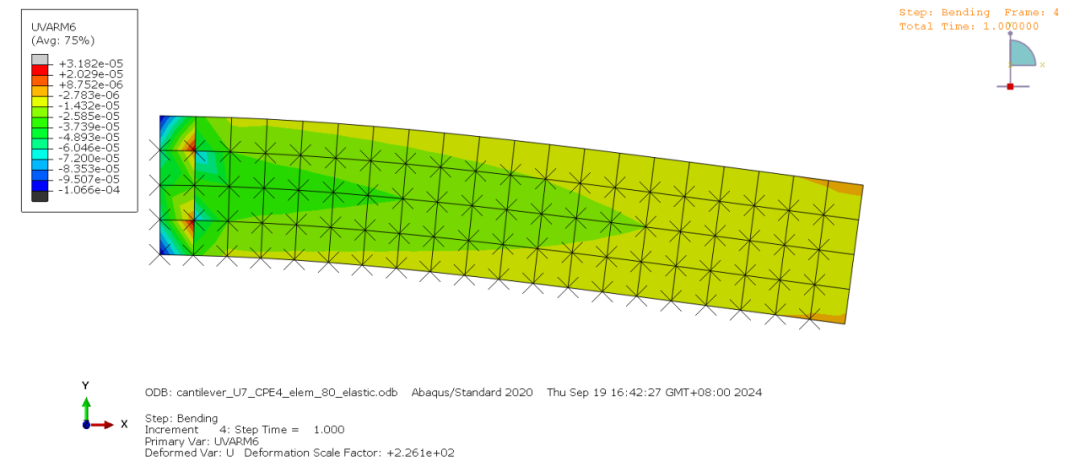
UVARM1~UVARM6的数值云图为



叁
总结
该程序采用线弹性小变形理论编写了适用于CPE8等单元的UEL程序,采用module功能将不同的代码段封装到不同的文件中,在主程序uel_mech中进行引用。为了给用户自定义单元进行可视化,采用UVARM子程序进行应变应力等数据的传递,通过在自定义单元上嵌套一层属性值无限小的abaqus自带单元完成了自定义单元的可视化。