
首页/文章/ 详情

FEMFAT焊缝建模指导方针_EC3欧洲标准
5月前浏览174

摘要:

本文是 FEMFAT 5.0 依据欧洲规范 EC3 编制的焊缝疲劳建模指导文件,系统给出各类焊接接头的 FAT 等级、材料编号与建模规则。文档覆盖对接焊、T 型焊、十字焊、角焊、搭接焊、空心型材接头及桁架节点,区分全熔透 / 非全熔透、承载 / 非承载、单面 / 双面、有无端部等工况,明确垂直与平行方向 FAT 值、焊趾 / 焊根细节分类及对应 MAT 编号。采用薄壳单元建模,规定焊缝节点标记、等效材料号映射与结构应力法流程,完全对接 Eurocode 3 焊缝疲劳评定体系,为钢结构焊接接头有限元疲劳仿真提供标准化建模与参数选取依据。
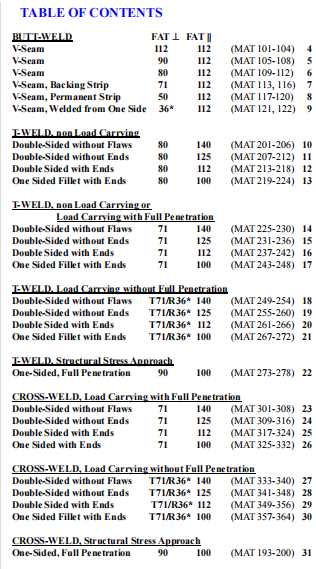
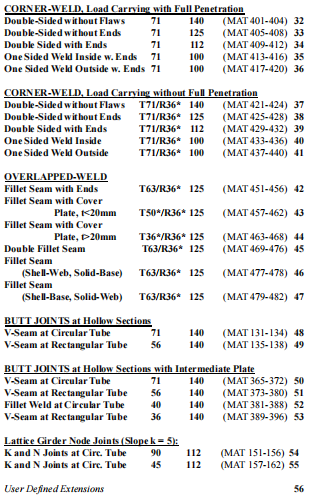
image.png

image.png

Legend:

Gridpoints without special meaning...   

(Shell-) Elements without orientation by...     TOP

and without Material-ID MATxxx  are flexible in orientation.

RSSC (Rigid Shell Solid Connector) are marked by colour.

Welding-Seam-Nodes, which have to be marked with Cxxx,

to be recognized by  FEMFAT WELD look like...   

Possible Colours of Weld-Seam-Nodes :

C100 ... Welding seam

C101 ... End of welding seam not welded around

C102 ... End of welding seam is welded around

C103 ... Combined weld seam node

C104 ... Combined node =weldseam end not welded around

C105 ... Combined node =weldseam end is welded around  C106 ... Start of weld seam not welded around

C107 ... Start of weld seam welded around

C108 ... Combined node =weldseam start not welded around

C109 ... Combined node =weldseam start is welded around


Weld Type:      BUTT-WELD

Seam Shape:  V-Seam

Detail Category  Perpendicular             112

Detail Category  Parallel                        112

Detail Category  Weld End                    112
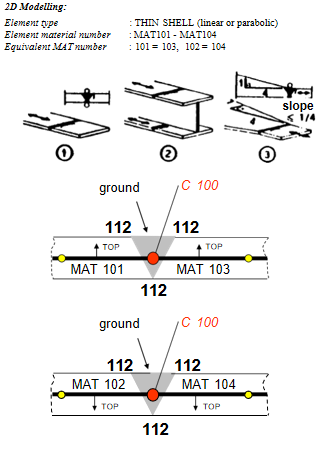
image.png


Weld Type:      BUTT-WELD

Seam Shape:  V-Seam

Detail Category  Perpendicular              90

Detail Category  Parallel                        112

Detail Category  Weld End                    100
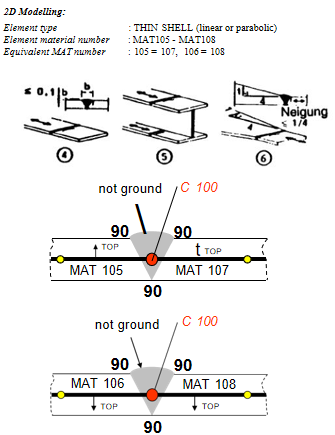
image.png


Weld Type:      BUTT-WELD

Seam Shape:  V-Seam

Detail Category  Perpendicular              80

Detail Category  Parallel                        112

Detail Category  Weld End                    100
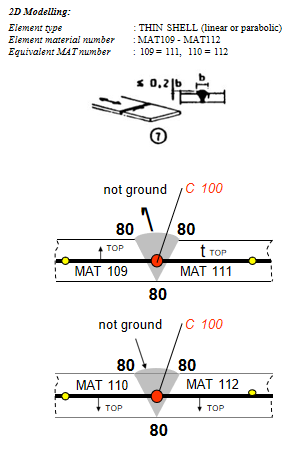
image.png


Weld Type:      BUTT-WELD WITH BACKING STRIP

Seam Shape:  V-Seam

Detail Category  Perpendicular              71

Detail Category  Parallel                        112

Detail Category  Weld End                    100
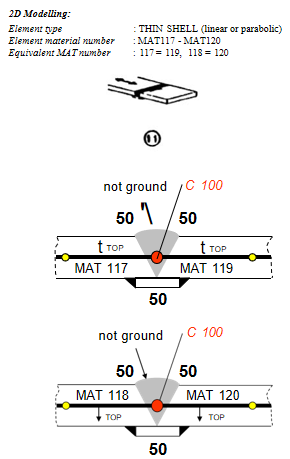
image.png


Weld Type:      BUTT-WELD WITHOUT BACKING

STRIP (welded from one side)

Seam Shape:  V-Seam

Detail Category  Perpendicular            36*

Detail Category  Parallel                        112

Detail Category  Weld End                    100
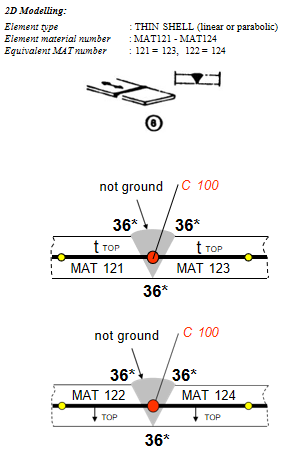
image.png


Weld Type:      NON LOAD CARRYING  T-WELD

Seam Shape:  Double Sided Weld, without Flaws

and Weld Ends

Detail Category  Perpendicular              80

Detail Category  Parallel                        140

Detail Category  Weld End                      80
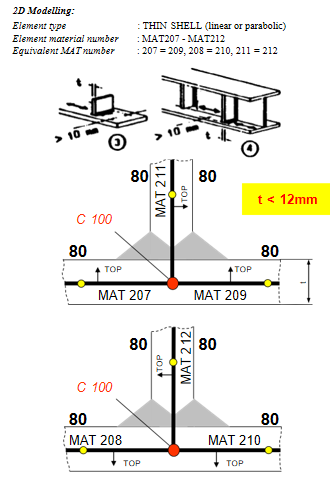
image.png


Weld Type:      NON LOAD CARRYING  T-WELD

Seam Shape:  Double Sided Weld, with Weld Ends

Detail Category  Perpendicular              80

Detail Category  Parallel                        112

Detail Category  Weld End                      80
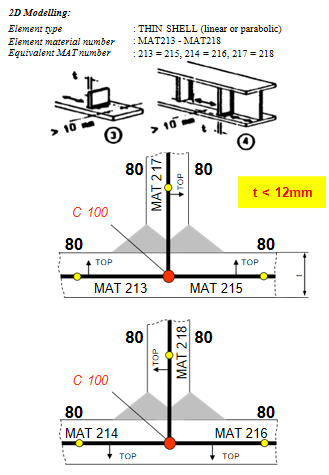
image.png


Weld Type:      NON LOAD CARRYING  T-WELD

Seam Shape:   One Sided Weld, with Weld Ends

Detail Category  Perpendicular              80

Detail Category  Parallel                        100

Detail Category  Weld End                      80

2D Modelling:

Element type                           : THIN SHELL (linear or parabolic)

Element material number       : MAT219 - MAT224

Equivalent MAT number        :
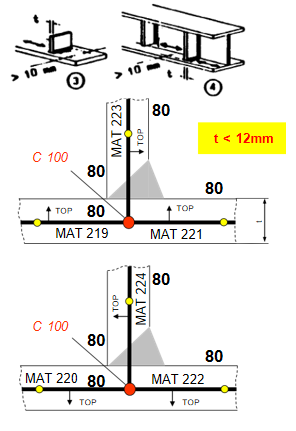
image.png

Weld Type:      T-WELD, NON LOAD CARRYING OR

LOAD CARRYING FULL PENETRATION

Seam Shape:  Double Fillet Weld, without Flaws

and Weld Ends

Detail Category  Perpendicular              71

Detail Category  Parallel                        140

Detail Category  Weld End                      71
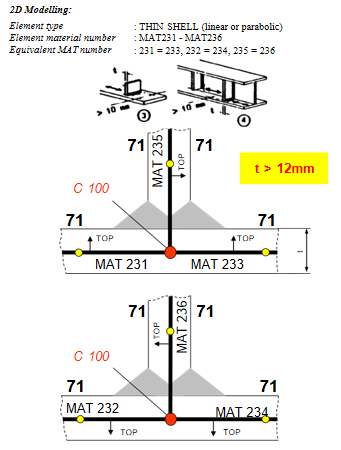
image.png

Weld Type:      T-WELD, NON LOAD CARRYING OR LOAD CARRYING FULL

PENETRATION

Seam Shape:  Double Fillet Weld, with Weld Ends

Detail Category  Perpendicular              71

Detail Category  Parallel                        112

Detail Category  Weld End                      71
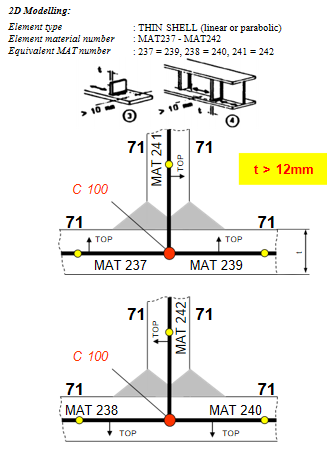
image.png

Weld Type:      T-WELD, NON LOAD CARRYING OR LOAD CARRYING FULL

PENETRATION

Seam Shape:   One Sided Fillet Weld, with Weld Ends

Detail Category  Perpendicular              71

Detail Category  Parallel                        100

Detail Category  Weld End                      71
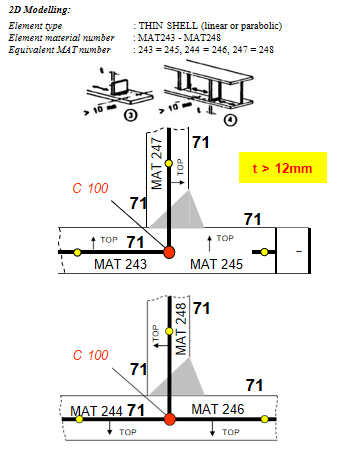
image.png

Weld Type:      LOAD CARRYING T-WELD WITHOUT FULL PENETRATION

Seam Shape:  Double Fillet Weld, without Flaws              and Weld Ends

Detail Cat.  Perpend.       Toe 71, Root 36*

Detail Category  Parallel                        140

Detail Category  Weld End                      71
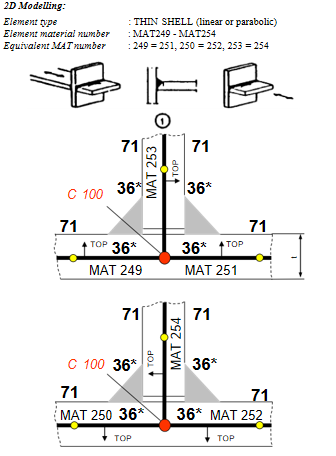
image.png

Weld Type:      LOAD CARRYING T-WELD WITHOUT FULL PENETRATION

Seam Shape:  Double Fillet Weld, without Weld Ends

Detail Cat.  Perpend.       Toe 71, Root 36*

Detail Category  Parallel                        125

Detail Category  Weld End                      71

Weld Type:      LOAD CARRYING T-WELD WITHOUT FULL PENETRATION

Seam Shape:  Double Fillet Weld, with Weld Ends

Detail Cat.  Perpend.       Toe 71, Root 36*

Detail Category  Parallel                        112

Detail Category  Weld End                      71
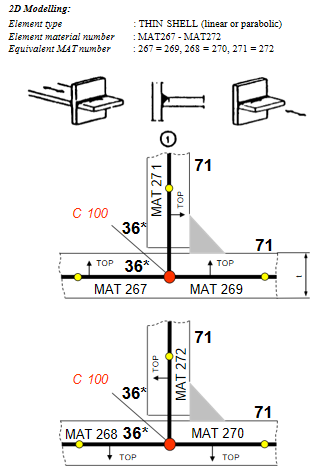
image.png


详细内容请见附件


免责声明:


本页面/内容部分素材来源于互联网公 开 信 息,旨在传递更多信息,不代表本平台立场。

版权归原作者或机构所有,如涉及侵权,请通过平台联系我们,我们将在核实后第一时间处理。

本平台对转载内容的真实性、准确性不作任何保证,用户需自行判断并承担使用风险。

附件

免费M14-FEMFAT焊缝建模指导方针_EC3欧洲标准.pdf
焊接FEMFATUMGID疲劳材料
著作权归作者所有,欢迎分享,未经许可,不得转载
首次发布时间:2026-05-15
最近编辑:5月前
仿真支持爱好者
在仿真的路上越走越远
获赞 333粉丝 27文章 318课程 0
点赞
收藏
作者推荐

AQWA Workbench 12.0 版本的官方帮助文档

摘要:本文是ANSYSAQWAWorkbench12.0官方帮助文档,介绍AQWAWB图形化界面的操作与建模规范。文档说明软件基于DesignModeler几何建模,支持面/线/点质量、点浮力、圆盘单元,提供自动网格划分与局部加密功能。核心支持水动力绕射分析,可设置重力、波向、波频与结构选择,输出静水力、响应幅值算子(RAO)、压力与运动结果。文档给出传统AQWA命令与WB树对象的对照,明确建模规则、单元限制、结果查看与动画导出方法,为海洋结构物初期水动力仿真提供标准化操作指南。ANSYSAQWAWBHelpCopyrightandTrademarkInformation©2009SASIP,Inc.Allrightsreserved.Unauthorizeduse,distributionorduplicationisprohibited.ANSYS,ANSYSWorkbench,Ansoft,AUTODYN,EKM,EngineeringKnowledgeManager,CFX,FLUENT,HFSSandanyandallANSYS,Inc.brand,product,serviceandfeaturenames,logosandslogansareregisteredtrademarksortrademarksofANSYS,Inc.oritssubsidiariesintheUnitedStatesorothercountries.ICEMCFDisatrademarkusedbyANSYS,Inc.underlicense.CFXisatrademarkofSonyCorporationinJapan.Allotherbrand,product,serviceandfeaturenamesortrademarksarethepropertyoftheirrespectiveowners.DisclaimerNoticeTHISANSYSSOFTWAREPRODUCTANDPROGRAMDOCUMENTATIONINCLUDETRADESECRETSANDARECONFIDENTIALANDPROPRIETARYPRODUCTSOFANSYS,INC.,ITSSUBSIDIARIES,ORLICENSORS.Thesoftwareproductsanddocument-ationarefurnishedbyANSYS,Inc.,itssubsidiaries,oraffiliatesunderasoftwarelicenseagreementthatcontainspro-visionsconcerningnon-disclosure,copying,lengthandnatureofuse,compliancewithexportinglaws,warranties,disclaimers,limitationsofliability,andremedies,andotherprovisions.Thesoftwareproductsanddocumentationmaybeused,disclosed,transferred,orcopiedonlyinaccordancewiththetermsandconditionsofthatsoftwarelicenseagreement.ANSYS,Inc.iscertifiedtoISO9001:2008.U.S.GovernmentRightsForU.S.Governmentusers,exceptasspecificallygrantedbytheANSYS,Inc.softwarelicenseagreement,theuse,du-plication,ordisclosurebytheUnitedStatesGovernmentissubjecttorestrictionsstatedintheANSYS,Inc.softwarelicenseagreementandFAR12.212(fornon-DODlicenses).Third-PartySoftwareSeethelegalinformationintheproducthelpfilesforthecompleteLegalNoticeforANSYSproprietarysoftwareandthird-partysoftware.IfyouareunabletoaccesstheLegalNotice,pleasecontactANSYS,Inc.PublishedintheU.S.A.AQWAWBIntroductionAQWAWBisagraphicalinterfaceforAQWA.ItisusedtocreateanelementbasedmodelfromgeometrydefinedinDesignModelerformat,applyAQWAspecificinputandviewresults.ThelayoutissimilartootherWorkbenchbasedapplications(e.g.Mechanical)andcomprisesanumberofobjectsinatreebasedlayout.Foradescriptionofaparticulartreeobject,selectalinkfrombelow.IfyouareanexistingAQWAuser,thenyoumayalsofindthe"InformationforexistingAQWAusers"(p.3)ausefulcomparisonofcapabilitiesanddefinitionmethodology.Eachiteminthetreeisacommandobject,thepropertiesoftheseareusedtocontroltheanalysisandviewtheresults,eachtypehasadifferentfunctionandtheirabilitiesaredescribedhere.Mostofthesetreeobjectscanbeselectedandthentherightmousebuttonusedtomodifycommonfunctions,alsothisbuttoncanbeusedtoaddadditionalobjects,suchasmassesorresultviews.Alternativelythedynamictoolbarcanbeusedforaddingadditionalobjects.Thereareanumberofadditionalbuttonsthatalsocontroltheview.Table1DefinitionoftreeobjectsInformationforexistingAQWAusersIfyouarefamiliarwiththeAQWAdatafilesandhelpsystem,thenyoucanusethissectiontofindwhereanexistingcommandislocatedintheAQWAWBtreeobjects.Table1CrossreferenceoftreeobjectswithAQWAcommandsGeneralmodellingrequirementsDesignModeleristhetoolusedforcreatinggeometryforAQWAWB,forimportinggeometrycreatedinDesignModeler,seetheGeometrysection.WhenusingDesignModelertodefinethegeometrythereareanumberofaspectsthatyoushouldconsidertoensurethatyourmodelissuitableforanalysiswithAQWA,suchas:Ensurethatthemodelissplitatthewaterline,importorcreateeachstructureandthenuseaplanetosplitthesurfacebodiesatthewaterlevelWhenusinglinestocreatebeams,onlytubularsectionsaresupportedinAQWAWB,allothersectionswillresultinastubelementbeingformedandyouwillneedtodefineadditionalinformationinAQWAWBEachvessel/structureshouldbeapart,soallthebodiesthatyouhaveshouldbegroupedviathemultibodypartfacility.Note,thereisnotthepossibilitytorenamethesewithinAQWAWBAQWAWBInterfaceOverviewAQWAWBfollowstheconventionsusedinotherANSYSWorkbenchproductswhereitisappropriateforAQWA.Theuserinterfacehasanumberofkeyareas,butistreedriven.Alongwiththetreeandit'sdetailspanearetoolbarsandgraphical/textdisplaywindowsThetoolbarusesanumberofstandardWorkbenchiconsalongwithanumberofspecialistAQWAWBadditions.Thetreeandthedetailsarewheretheobjectsthatareusedtodefinethemodellingrequirementsareor-ganised.Dependingupontheselectioninthetree,adetailpane,normallylocatedbelowthetreewillshowthedetailsoftheselectedobject.Thereiseitheroneortwootherwindowsshown,dependinguponthestateoftheanalysisortreeitemthatisselected,firstlythemainwindow,thisgenerallyshowsthemodel(eithergeometryormeshviews)and,ifyouareviewingHydrostaticsresults,thepropertiestabisenabledfortextbasedresults.Thesecondarywindowisusedfordisplayingmessages,controltheresultsanddisplayinggraphs.Thiswillappearautomat-ically,dependinguponthetreeitemselected.ProjectUsethistoenterincustominformationabouttheauthorandanyreferencesordescriptionforthisanalysis.Informationaboutthecreationdateofthefileandwhenitwaslastmodifiedisalsoautomaticallysaved.Thisdataisalsowrittentotheanalysisdatafileforlaterreferenceandtheprojectnameisused.ModelThereistheoptiontochangethemodelnameforeasierreference.Itisusedtonameafolderinwhichthesubsequentanalyseswillbestored.Ifthisisunchanged,whenageometryisattachedthemodelnamedefaultstobethatofthegeometry.GeometryWhenselectedaDesignModelergeometrydatabase(.agdb)canbeattachedtothemodel.DesignModelercanbeusedtoeithercreateyourmodelgeometryortoimport/linktoexistingCADbasedgeometry.Whenattachinggeometry(usingthecontextmenuortoolbar),eachpartbecomesaseparatestructureinAQWA.Ifastructureistobeformedofbothdiffractingandnon-diffractingelements,theseshouldbeinseparatedefinedbodieswithinthe(multi-body)part.WhenattachinggeometrytheModelnameisautomaticallychangedtobethatofthegeometry,theanalysisisstoredinafolderunderthemodelname.Theunitsalsochangetobethoseofthemodel;thesecanbemodifiedviatheunitsmenuifdesired.AQWAWBassumesthatthestillwatersurfaceparalleltotheXYplaneandZispositiveup.Allstructuresarelocatedinaglobalanalysisspace;notethatHydrostaticResults(p.20)andHydrodynamicGraphicalResults(p.21)arealsopresentedinglobaldirections.Withinthegeometryyoucanselectthetypesofbodiesthatwillbeattached.Onceattachedthediffractingbehaviourofsurfacegeometrycanbeselected,linescanbesettobeTubular(TUBEElements)orSlenderTube(STUBelements)andadditionalAQWAspecificobjectscanbeadded,suchasPointMasses(p.16),PointBuoyancy(p.16)andDisc(p.16).Theseageometry’swaterlevel,depthandsizecanbeusedtoalterthegraphicalview.Thesealevelmustcoincidewithwheresurfacegeometryissplittoformabovewater(non-diffracting)andbelowwater(dif-fracting)sections.Ifthisissetbeforeattachingageometryfile,surfaceswithcentroidbelowthislevelwillautomaticallybesettodiffractingandthoseabovenon-diffracting.Youcanmanuallychangebodiestobenon-diffractingordiffracting.ModificationtothewaterlevelwillaffecttheZLWLkeywordintheAQWAdatafile.Thewaterdepthcanalsobeset,aswellasmodifyingthegraphicaldisplay,thiswillsetthedepthofwaterfortheanalysisviatheDPTHkeywordintheAQWAdatafile.Thedensityofthewatercanalsobechanged;thiswillaffecttheDENSkeywordintheAQWAdatafile.Note:ItisnotyetpossibletoemploysymmetryinAQWAWB,hencethefullmodelmustbemeshed.PartsApartisusedtogrouptheobjectsthatformashiporotherstructurethatistobeanalysedinAQWAintheStructureSelection(p.18),eachpartwillbeassignedastructurenumberfortheanalysis.Thenameisreadinfromthegeometrydatabaseandthegraphicalviewwillshowthepart;theappropriatestructurewillbehighlightedwhenthepartinthetreeisselected.Tohelpvisualisation,itispossibletoshoworhidespecificpartsusingthePartVisibilityoption.ThePartActivityoptionisusedtodecidewhatstructuresareusedintheanalysis.Bydefaultthestructureissettobefreetomove.Alternatively,thewholestructurecanbefixedusingthe"Structureisfixedinplace"option,inwhichcaseaFIXDkeywordisused.Ifanautomaticallygeneratedinternallid(ILIDAUTO)isrequiredtopreventirregularfrequencyproblems,thenthiscanbeselectedhereanditwillbeautomaticallygeneratedduringtheAQWAanalysis.Ifyouhaveastructurewithamoonpoolwhereanautomaticinternallidisnotsuitable,thenyoucanformanexternallidusingaSurfaceBodies(p.15)withtheabstractgeometryoption.Coefficientsforadditionallinear,frequencyindependentdampingabouttheglobalXandYaxescanbeinput.ForavesselmodelledconventionallywithitslongitudinalaxisintheglobalXdirection,RXwillcorres-pondtoroll.Thesedataitemsarestrictlythe4,4and5,5termsinthelineardampingmatrix,andareequivalenttothe4thand5thcoefficientsontheFIDDcardinAQWA.Usethecontext(rightclick)menuorthetoolbarstoaddorremoveadditionalAQWAspecificelementsintothegeometry,suchas:PointMasses(p.16),PointBuoyancy(p.16)andDisc(p.16).Afulllistofthetypesofbodiesis:SurfaceBodiesLineBodiesPointMassesPointBuoyancyDiscSurfaceBodiesSurfacebodiesareareasthatcanbemeshedtocreatediffractingornon-diffractingelementsfortheAQWAanalysis.ThenameofthesurfacebodywillbeobtainedfromthatgiveninDesignModeleranditcannotbechangedhere.Ifabodyisnotrequiredfortheanalysisitcanbesuppressed.Suppressedbodieswillnotbemeshedandwillbeexcludedfromtheanalysis.Itispossibletochangethetypeofsurfacefrombeingaphysicaldefinitiontoanabstractdefinition,ifitistobephysicalgeometrythenthereisanoptiontosetittoformeitherdiffracting(TPPLDIFForQPPLDIFF)ornon-diffracting(TPPLorQPPL)elementsfortheanalysis.Forabstractgeometry,anumberofoptionsareavailabletoselecthowthisgeometryistobeused.Ifanareaisofparticularinterest,thentheCustomResultsPositionsoptionenablesameshtobeappliedandeachnodeofthemeshwillformafieldpoint(FPNT)element,additionalinformationwillbeavailableatthesepoints.Alternativelyinternalandexternallidscanbecreatedtosuppressstandingwaveseitherbetweenstructuresorwithinstructures.Oncemeshed,thesewillformthebasisfortheILIDorVLIDdata.Note,automaticinternallidscanbeselectedusingtheParts(p.14)options.Ifthegenerationofanexternallidischosen,twoadditionalparametersarerequired.Thefirstisadampingfactorbetween0and1.Thefactorrepresentshoweffectivethelidistobe,0willresultinnoreductioninvelocityand1willpreventanyverticalvelocityunderthelid.ThesecondparameteristermedtheGap.Itisarepresentativesizeforthelid;typicallythedistancebetweenthetwovesselsorthewidthofamoon-pool.Itenablesthelidpropertiestobetunedtotheresonantfre-quencyofwavesinthegapLineBodiesLinebodiesareusedtocreatesingleelementsforAQWA,howtheyareinterpreteddependsuponthecrosssectionoftheline;ifithasacircularcrosssection,thenitwillbeautomaticallyconvertedintoatubularlineandwillcreatestandardtubular(TUBE)elements,allothersectionswillcreateslendertube(STUB)elements.Thecontentofthedetailspanechangesconsiderablydependinguponthetypeofline,thedetailsaredis-cussedbelow.Linetype:TubularIfthelineinDesignModelerwasdefinedwithatubularsection,thelinebodywilldefaulttothissetting;thetubediameterandthicknessareautomaticallyreadfromtheDesignModelerdata,alongwiththecalcu-latedinertiavalues.Inthiscasethereareoptionstohavebothoftheendsofthetubesealed,thisisthedefaultandinthiscasethetubewouldbebuoyant,however,thetubedoesnothavelongitudinaldragoraddedmassunlessdiscsarecreatedattheends.DiscscanautomaticallybeappliedateitherorbothendswiththeTubeEndClosureoption,inthisscenario,defaultdiscparametersareused,ifyourequiredifferentparameters,discscanbeexcludedhereandaddedmanually.Viscousdragandaddedmasscoefficientscanbedefinedandwillbewrittentothedatafile,althoughdragisnotusedinhydrodynamicorhydrostaticanalyses(AQWA-LINE).Adensityofthetubeisalsorequired;thisdefaultstothestandardvalueforsteel.Linetype:StubForallsectionsotherthantubular,onlytheinertiaswillbeobtainedautomaticallyfromtheparametersthatareenteredinDesignModeler.Ifastubelementisnotrequired,thenitispossibletochangeittoatubularlineanddefinethediameterandthicknesswithinAQWAWB.IfastubelementischosenthereareoptionstochangethediameterinboththelocalZandYdirections,aswellasthecrosssectionalarea.ForAQWAvalidcrosssectionalareasvarybetweenanellipseandarect-anglewiththewidthandheightofthetwodiameters.Itisalsopossibletodefinethemasscontributionthatthestubwillcontributetothemodel.PointMassesPointmass(PMAS)elementscanbeinsertedintothemodel;thepropertiescaneitherbeinputmanuallyorcanbeProgramControlled.Amanualpointmassmusthaveallitspropertiesinputbytheuser.Momentsofinertiacanbedefineddirectlyorbyinputtingradiiofgyration.Ifaprogramcontrolledpointmassisused,themassandthehorizontalpositionwillbecalculatedfromthepanelelementsinthestructure(i.e.excludingtubularstublinesandpointbuoyancybodies).Themasswillequalthemassofwaterdisplaced,andthehorizontalpositionwillbethatofthecentreofbuoyancy.Themomentsofinertia(orradiiofgyration)andverticalpositioncannotbedeterminedbytheprogramandmustbeinput.Tip:afterinsertingyourpointmasses,insertahydrodynamicdiffractionanalysisandsolveforhydrostaticsonly,thenthehydrostaticresultswillbeavailableandthevaluesofmasswillbecalculatedbeforeperformingthefullAQWAanalysis.PointBuoyancyPointbuoyancy(PBOY)elementscanbeinsertedintothemodel;theserequireapositionandavolume.DiscDiscelements(DISC)canbeusedtocreateanareathathasdragandaddedmassinthedirectionperpen-diculartothedisc.Thediameterofthediscisrequiredalongwiththecentroidandthedefinitionofthenormaldirection.Ifthecentroidisatthepositionofanexistingvertex,thenthatcanbeselected,otherwise,directentryoftheco-ordinatesispermitted.Thenormalcanalsobeselectedinthisway.Thedefaultvaluesoftheaddedmassandviscousdragcoefficientscanbemodifiedifdesired.Note:dragisnotusedinhydrodynamicdiffractionanalyses(AQWA-LINE).MeshThemeshisautomaticallygeneratedonthebodiesinthemodel;itsdensityisbasedonthedefeaturingtoleranceandmaxelementsizeparameters.Theseparametersapplytothewholestructure,althoughpartsorbodiesofthestructurecanbesuppressedtopreventun-necessarymeshesbeingcreated.Ifsuppressed,theywillbeexcludedfromtheanalysisandsubsequentresultdisplay.Thedefeaturingtolerancecontrolshowsmalldetailsaretreatedbythemesh.Ifthedetailissmallerthanthistolerancethenasingleelementmayspanoverit,otherwisethemeshsizewillbereducedinthisareatoensurethatthefeatureismeshed.Thedefeaturingtolerancecannotbegreaterthan0.6×maxelementsize.Themaximumelementsizecontrolsthemaximumsizeoftheelementthatwillbegenerated.InAQWAthisisexplicitlyrelatedtothewavefrequencyandwaterdepth,whichcanbesetintheGeometry(p.13);ineithercasemodificationwillcausethemaximumelementsizetobeadjustedaccordingly.Ifasmallerelementsizeisrequiredforaparticularpartorbody,thenoneormanyMeshSizingobject(s)canbeaddedtorefinethemesh.TheMeshingTypeoptioncontrolsthealgorithmthatisusedforthemeshgeneration,thedefaultisforittobeProgramControlled,inwhichcase,theSurfaceOnlyMeshingalgorithmisusedforpartsthatonlycontainsurfacesandtheCombinedMeshingisusedifthepartalsoincludeslines.IftheProgramControlledoptionfailstoproduceasatisfactorymesh,thenyoumaycontroltheselectionmanually.Thelargerthemaximumelementsize,thelessaccuratetheresults.However,theAQWAsolverislimitedto12000elements,ofwhich8000maybediffracting.Thenumberofgeneratedelementsisreported,althoughtheseexcludeanynon-meshedelements(e.g.Discs).Furthermore,ifthesizeissettoolargeanddefeaturingisalsolarge,themeshingalgorithmmaygeneratesingleelementsatthebowofaship.ThiselementarrangementisnotpermittedforAQWA.Usethetoolbaritemorcontextmenutogeneratethemesh画画Note:ItisnotyetpossibletoemploysymmetryinAQWAWB,hencethefullmodelmustbemeshed.MeshSizingAddingameshsizingobjectenablestherefinementofameshonagivenpartorbodybyenablingasmallerelementsizetobeassociatedtothegeometry.Anynumberofsizingobjectscanbeaddedtothetreeasrequired.AnalysisToperformananalysisthespecificanalysistypeneedstobeadded,thiscanbeachievedbyselectingthemodelandthenusingtheInsertAnalysisbutton.AtpresentonlyHydrodynamicDiffraction(AQWA-LINE)analysesaresupported.WhenaHydrodynamicDiffractionanalysisisinserted,therearetwoanalysisoptions,eithertocalculatetheHydrostaticsonly(AQWAstages1and2)ortocalculatethefullHydrodynamicresults.TheanalysisnamecontrolsthenameofthegeneratedAQWAdatafiles,forthisreasonitislimitedtobe28charactersinlength;youareabletochangethenamewithinthedetailspanel.Theanalysisnamewillautomaticallyhaveanumberfollowingit;thiscausesthenametobeuniqueforthissession.Thenumberpreventspreviousanalysesbeingover-written;youwillbewarnedifananalysisofthegivennameexists.ForeachHydrodynamicDiffractionanalysis,additionalWaveDirectionsandWaveFrequencyobjectscanbeaddedtotheanalysisuptothemaximumofoneperstructure.Checkswillbecarriedoutaspartoftheanalysistoensurethateachstructurehasonlyonesetofwavedirectionsorwavefrequenciesapplied.Typicallyyouwillneedtodefineinputforthefollowingtreeitemsforananalysistobecarriedout:AalysisOptionsStructureSelectionGravityWaveDirectionsWaveFrequenciesResultsAnalysisOptionsTheanalysisoptionsobjectenablesthemodificationofhowtheanalysisrunsandtheresultsthatarepro-duced.TheSeaGridSizeFactorcontrolshowmuchlargertheseaareaisthanthestructure(orstructuregroup,ifthereareinteractingstructurespresent).Thedefaultvalueof2willcausetheseaareatobetwiceaslongasthestructureintheXorYdirections,aratioofX=1.6Yismaintained.OutputFileOptionsTheseoptionscontrolwhatisoutputtedtotheAQWAoutputtextfileortospecificadditionalfiles,refertotheAQWAreferencedocumentationformoredetails.QTFOptionsTheseoptionscontroltheQTFoutput;refertotheAQWAreferencedocumentationformoredetails.CommonAnalysisOptionsTheseoptionscontrolhowtheanalysisisperformedandwhatactionistakeninanumberofinstances;innormalcircumstancestheywillnotneedadjusting,however,ifyougetmodellingwarningsthenyoumaywishtoturnonthe"Ignoremodellingruleviolations"option,refertotheAQWAreferencedocumentationformoredetails.StructureSelectionThestructureselectiontreeobjectenablesthedefinitionofinteractingstructures,alongwithanythatyouwanttoexcludeforthisparticularanalysis.Italsoenablestheordertobechanged;theAQWAsolverdemandsthatagroupofinteractingstructuresareconsecutivelyorderedfortheanalysis.RefertotheAQWAdocumentationformoredetailsofthisrequire-ment.Structurescanbeselectedgraphically(useCTRLkeytoselectmorethanone)forinclusioninagrouportobeexcludedfromtheanalysis.Ifastructureisexcluded,thenitwillautomaticallyberemovedfromanygroupsandthestructureorder,however,theselectionsinwavedirectionsandfrequencieswillneedtobeupdatedexplicitly.GravityThistreeobjectenablesthedefinitionofgravityforthisanalysis;changescanbemadeifyouwanttotrytomatchanotheranalysis.WaveDirectionsThewavedirectionstreeobjectenablesthedefinitionofarangeorsinglewavedirectiontouseintheanalysis.Thewavedirectionscanbeappliedtoeitherasingleormultiplestructureselection;theseareselectedgraphicallyandarehighlightedintheviewifthe"SelectTreeRelatedItems"isturnedon.IfdifferentwavedirectionsaretobeappliedtodifferentstructuresthiscanbeachievedbyselectingtheAnalysistreeitemandinsertingadditionalwavedirectionobjects.Thiswillonlybepermittedifthestructuresareindifferentinteractinggroups.Theoptiontoapplyastructureforwardspeedisalsoincluded,ifoneisapplied,thenonlyasinglewavedirectioncanbeanalysed.Wavesareautomaticallycreatedin-180and+180directionsandtheneithertheintervalorthenumberofintermediatedirectionscanbespecified.Ifadirectionrangeisofparticularinterest,additionalrangesorspecificdirectionscanbeadded.Duplicateddirectionswillautomaticallyberemoved;althoughthenumberofdirectionsdoesnotcontributegreatlytotheanalysistime,thereisalimitimposedofatotalof41directionsforanyonestructure.Note:ItisnotpossibletoemploysymmetryinAQWAWB.WaveFrequenciesThewavefrequenciestreeobjectenablesthedefinitionofarangeorsinglewavefrequencytouseintheanalysis.Thewavefrequenciescanbeappliedtoeitherasingleormultiplestructureselection;theseareselectedgraphicallyandarehighlightedintheviewifthe"SelectTreeRelatedItems"isturnedon.IfdifferentwavefrequenciesaretobeappliedtodifferentstructuresthiscanbeachievedbyselectingtheAnalysistreeitemandinsertingadditionalwavefrequenciesobjects.Thiswillonlybepermittedifthestructuresareindifferentinteractinggroups.Similarlytothewavedirections,eitherasingleorrangeoffrequenciescanbespecified.Thestartfrequencywilldefaultto0.1rad/sandtheendfrequencywilldefaulttothatdeterminedbythemesh.Frequenciescanbedefinedeitherbythefrequencyorbyinputtingaperiod,themaximumwaveperiod(andequivalentfrequency)permittedis200s.Theintermediatepositionscanbedefinedeitherbyaconstantfrequencyorperiod,orbyenteringanumbeofvalues.Ifanumberofintermediatevaluesarechosen,theywillbeequallyspaceddependingupontheintervaltype.Additionalfrequenciescanbeemployedbyspecifyingadditionalfrequencies;anyduplicatefrequencieswillbeautomaticallyremoved.Thenumberoffrequencieschosenextendsthesolutiontimelinearly.andmayneedtobeupdatedmanually.ResultsResultscanbeaddedwhenthisobjectisselected;thiscanbeeitherbeforeorafterananalysisisperformed.Thiscanbeachievedbyeitheraddinganobjectviaresulttoolbarorviathecontext(rightclick)menu.Iftheinputtoananalysisischangedthentheresultsobjectswillindicatethattheyareoutofdateviatheyellowlighteningbolticon,however,ifpreviousresultsexist,theywillstillbeavailableuntiltheanalysisisre-run.Thefollowingtypesofresultsareavailable:HydrostaticResultsHydrodynamicGraphicalResultsHydrodynamicPressureandMotionResultsHydrostaticResultsThehydrostaticsresultstreeitemenablesyoutoviewthecentresofbuoyancy,floatationandgravityinthegraphicalviewonceahydrostaticorhydrodynamicsolvehasbeenperformed.DetailedhydrostaticresultsareavailablebyselectingthePropertiestabatthebottomofthegraphicalview.Resultscanbefilteredbytheselectedstructures.Anynumberofhydrostaticresultscanbeadded.Note:forbestgraphicaldisplayofhydrostaticresultschangingtheviewoptiontoWireframewithoutSelectTreeRelatedItemsisrecommended.HydrodynamicGraphicalResultsThehydrodynamicgraphobjectenablestheplottingofupto4comparativegraphresultsonceahydro-dynamicsolvehasbeenperformed.TheseresultscanbeplottedagainsteitherFrequencyorPeriodandcanbeeitherAmplitudeorPhasebased.Foreachlinetobeplotted,selecttherequiredinputtodefinethestructure,resultstypeandcomponentanddirection,ifappropriate.Thegraphwillappearautomaticallybelowthegraphicalview.Anynumberofgraphresultobjectscanbeadded.Note:AQWAalwaysproducesresultsinglobalco-ordinatesystems;traditionallyXdirectionisdefinedasbeingalongtheship’slength.However,iftheuserisawareoftheresultsorientation,thisdoesnothavetoberespectedinDesignModeler.HydrodynamicPressureandMotionResultsThepressureandmotionresultsobjectenablesthevisualisationanddisplayofanumberofresultsgeneratedfromAQWAonceahydrodynamicsolvehasbeenperformed.Anynumberofpressureandmotionresultsmaybeadded.Thestructurestobeshownunderaparticularsetofresultscanbeselectedinthegraphicalview,bydefaultallinteractingstructureswillbeshown,althoughthiscanbeturnedoffviatheIncludeInteractingStrsoption.Thefrequenciesanddirectionsavailablewillbethosethatexistforallselectedstructureswhichwerelastsuccessfullyanalysed(hydrodynamicsolve),orthosecurrentlyspecifiedifnoanalysishasbeenundertaken.Ifafrequencyordirectionisselectedandthenonasubsequentanalysisnotanalysed,thentheoptionwilldefaulttothefirstavailablefrequencyordirection.TheIncidentWaveAmplitudecanbemodifiedtoprovideresultsthatarefactoredfromtheunit1mwavethatisthedefault,extrememodificationmayextendresultsbeyondthecapabilitiesofalinearanalysis,inwhichcaseinaccurateresultscanbeproduced.TheresultpresentedcaneitherbedefinedbytheCyclicoption,whereanequivalentphasepositionoftheincidentwavecomponentcanbeselected(orisshowninthegraphasthetimeasaproportionofwaveperiodifarangeischosen),oranAmplitude,result.Furthermore,theMinimumandMaximumvaluesoftheselectedresultcanbedisplayed.WhenCyclicisselected,0°(ort/T=0)and90°(ort/T=¼)canbeselected,alongwiththefacilitytoenteraspecifiedphaseposition(inrotationunits),ortocreatearangeofresultsforanimation.Ifarangeofresultsisselected,thenthenumberofstepscanbeselected.Themoresteps,thesmoothertheanimation,butthelongertheresultstaketoprocess.Ifaparticularresultisrequiredfromtheanimatedset,thenthegraphcanbeclickedupontodisplay.Othercontrolsonthegraphdisplayenablethetimeoverwhichtheanimationoccurstobealteredandanavianimationtobecreated.Anumberofresultscanbepresentedinthismanner;bydefaultthewaveheightandtheinterpolatedpressureareshown.Itisonlypossibletoplotwavecontourswhenthestructurecontourtypeiscompatible,forthistobeachieved,theresultmustbeplottedonnodesandmustbeadisplacementtyperesult.Theinterpolatedresultsaredeterminedfromthepanel(element)pressuresthataregeneratedfromAQWA.Anycombinationofwavecomponentscanbeenabledanddisabledtoenablevisualisationandcheckingoftheresults.TheseameshsizecanbealteredviatheAnalysisOptions(p.18),SeaGridSizeFactorsetting.Theseameshextendsthroughoutthestructure;however,theresultsthatarepresentedwithindryareasarenotaccurate.免责声明:本页面/内容部分素材来源于互联网公开信息,旨在传递更多信息,不代表本平台立场。版权归原作者或机构所有,如涉及侵权,请通过平台联系我们,我们将在核实后第一时间处理。本平台对转载内容的真实性、准确性不作任何保证,用户需自行判断并承担使用风险。
未登录
还没有评论
课程
培训
服务
行家
VIP会员 学习计划 福利任务
下载APP
联系我们
帮助与反馈