ABAQUS地震反应谱分析

问题描述:
(木例的问题引用《有限元法及其应用》一书中陆新征博士ANSYS 算例的问题)
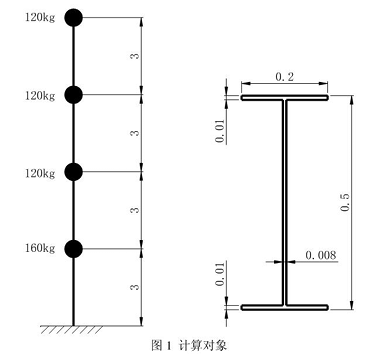
悬臂柱高 12m, 工字型截面(图 1), 密度 7800kg/m3, EX=2.1ellPa, 泊松比 0.3, 所有振 型的阻尼比为2%,在 3m 高处行 -集中质量 160kg, 在 6m、9m、12m 处分别为 120kg 的集 中质量。反应谱按 7 度多遇地震,取地震影响系数为 0.08, 第一组,III类场地,卓越周期 Tg=0.45s,
几点说明:
本例建模过程使用CAE:
添加反应谱必须在 inp 中加关键词实现,CAE 不支持反应谱;
*Spectrum 不可以在 keyword editor 中添力口, keyword editor 不支持此关键词读入:
ABAQUS 的反应谱法计算过程以及后处理耍比 ANSYS 方便的多。
操作过程为:
(1) 打开 ABAQUS/CAE, 点击 create model database 0
(2)进入 Part 模块,点击 create part, 命名为column, 3D、deformation wire。OK
(3)Create lines:connected, 分别输入 0, 0:0, 3;0, 6:0» 9:0, 12c OK。退出sketch。
(4)进入 property 模块,create material, name:steel » general-»density» mass density: 7800, mechanical—»elasticity—»elastic, young's modulus:2.1el1 » poisson's ratio: 0.3.OK
(5) Create section, name:I, category:beam, type:beam. Continue, create profile, name:I,shape:I, 按图 1 尺寸输入界面尺寸,ok。在 profile name 选择I, material name 选择 steel c Ok0
(6) Assign section, 选择全部,done, 弹出的对话框选择 section:I, Oh
(7) Assign beam orientation, 选择全部,默认值,OK.
(8) View—»part display options, 在弹出的对话框里勾选,render beam profiles, 以可视化梁截面形状。
(9) 添力口集中质量, Special—»inertia—»create, name:massl, type:point mass/inertia> continue* 选择0, 3 位置点,done» mass:160, ok。create, name:mass2, type: point mass/inertia« continue* 选择 0,6;0» 9:0, 12 位置点(按 shift 多选),done» mass: 120» Ok, dis miss 0
(10) Assembly—»instance part, instance type 选 dependent( mesh on part), Ok.
(11) Step—»create step, name:step-1» procedure type 选 freqency> continue, 在 basic 选项卡中,eigensolver 选择频率提取方法,木例选用lanczos 法,number of eigenvalues request, 选 value, 输入 10。Oke M create step> create step, name:step-2, procedure type 选 response spectrum, continue* 在 basic 选项卡中,excitations 选择单向 single direction, sumations 选择 square root of the sum of squares(SRSS)法,use response spectrum:sp(反应谱的name, 后面再 inp 中添加), 方向余弦(0,0, 1), scale factor: 1.进入 damping 选项卡,阻尼使用吏接模态(direct modal ), 勾选 direct damping data, start mode:1, end mode:8, critical damping fraction: 0.02。Ok
(12) 进入 load 模块, Load—»create boundary condition, name:fixed, step 选择 initial*
category mechanical, types displacement/ rotation, continue, 选择 0, 0 点, done» 勾选ul~ur3 所有6 个自由度。Ok。
(13) 进入 mesh 模块, object 选择 part, 点 seed edge by number, 选择所有杆, done* 输入 3, done, 点assign element type, 选择全部杆,done, 默认 B31, ok。点mesh part, yes。
( 14) 进入 job 模块,name:demo-spc» source:model, continue, 默认,0匕进入 job manager, 点击 write input, 在T.作目录生成demo-spc.inp 文件。
(15) 进入 ABAQUS 工作目录,使用UltraEdit 软件(或其他类似软件)打开 demo-spc.inp,
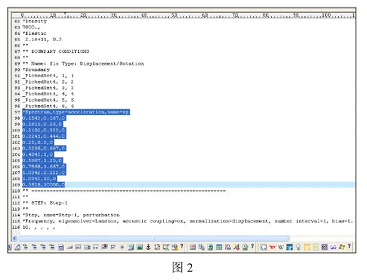
*Boundary 关键词的后面加如下根据问题叙述确定的反应谱:
*Spectrum,type=acceleration,name=sp
0.1543,0.167,0
0.1915,0.25,0
0.2102,0.333,0
0.2241,0.444,0
0.25,0.5,0
0.3295,0.667,0
0.4843,1,0
0.5987,1.25,0
0.7868,1.667,0
1.0342,2.222,0
1.0342,10,0
0.3528,10000,0
第一列为加速度,第二列为频率(图2)
保存。
(16) 进入 job 模块,create job. name:spc, source 选择 input file, input file select: 工作
目录下的demo-spc.inp, continues, 默认,ok, UA job manager, 选择 spc, submit, 计算成功!
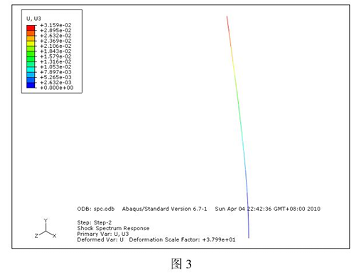
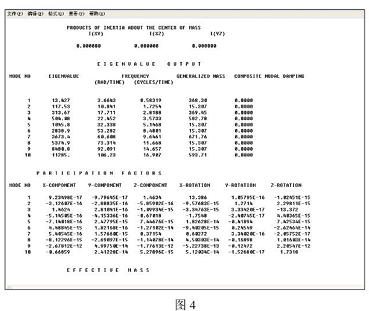
(17) 点击 results 进入后处理模块,可以看到最大位移为 3.159cm, 这与陆博士讲解的 ANSYS 结果 3.1611cm 基木一致。可以在看工.作目录下的 spc.dat 文件得到详细的频 率和模态分析结果(图3 4)
免责声明:
本页面/内容部分素材来源于互联网公 开 信 息,旨在传递更多信息,不代表本平台立场。
版权归原作者或机构所有,如涉及侵权,请通过平台联系我们,我们将在核实后第一时间处理。
本平台对转载内容的真实性、准确性不作任何保证,用户需自行判断并承担使用风险。