
FLAC3D 6.0——history常见问题解答

在FLAC3D中,软件默认每十步记录一个数据点,如果需要更改history的采样间隔,则使用以下命令:
history interval f; f为用户自定义的采样间隔,如history interval 5则表示每五步进行一次记录。
在Console快速查看history数据点,可以采用
history list series 'f' ;f是history的id号,或者名字。见下图。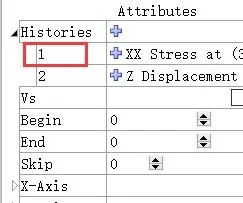
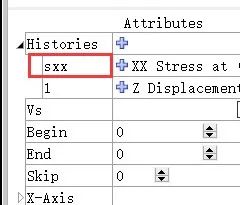
model newzone create brick size 6 6 6 group 'rock'zone splitzone group 'cut' range position-x 1 5 position-z 1 5zone cmodel assign m-czone prop bulk 5e8 shear 3e8 coh 3e6 fric 30zone ini dens 2800zone face skinzone face apply v-n 0 range group 'West' or 'East'zone face apply v-n 0 range group 'North' or 'South'zone face apply v-n 0 range group 'Bottom'model gravity 9.81; 方法1fish def fhist1zp = zone.near(3,3,3)fhist1 = zone.stress.xx(zp) ; 监测(3,3,3)点处的stress-xxendfish hist @fhist1model solve elastic; 方法2fish def fhist2zp = zone.near(3,3,3)sxx = zone.stress.xx(zp)endfish hist @fhist2fish hist @sxxmodel solve elastic
======怎么改变history的x轴内容======
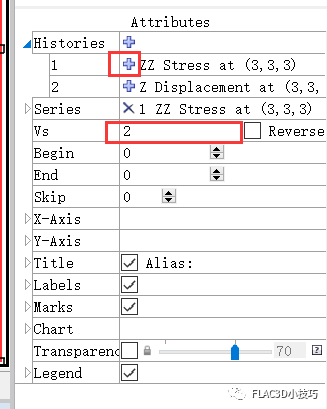
图2 鼠标操作切换X轴
plot item create chart-history active on history '1' vs '2' ======怎么改变数据点的正负号======
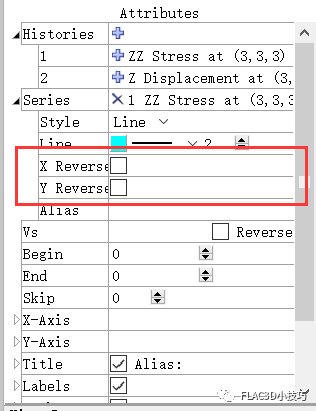
图3 鼠标操作改变坐标轴正负
命令流如下:
plot item create chart-history active on history '1' reversed-x on reversed-y on;读者可根据自己需要将'1'替换成实际的history id或者history name;不需要反号时,将on改为off即可,或者直接删除reversed-x/y on/off
登录后免费查看全文
著作权归作者所有,欢迎分享,未经许可,不得转载
首次发布时间:2023-12-26
最近编辑:2年前

硕士
专注FLAC3D中的小技巧分享...

相关推荐
最新文章
热门文章
