摘要:本文为DEFORM-3DV6.1热成形仿真实操流程,分步讲解锻件从出炉转运、模上静置到多次锻打全工序建模方法。依次介绍新建目录、前处理基础设置、单位与仿真模式选取,分步完成工件与模具的几何导入、网格划分、材料及热边界定义。针对空冷转运、模面静置、锻造三大工况,分别配置传热、变形求解参数,给出步数、步长、换热系数、摩擦系数等参考取值。同时说明模具装配、接触条件、运动控制与分步仿真技巧,还介绍多工位连续模拟、仿真结果调取、步长优化等实操要点,步骤规范,可直接用于各类热锻工艺仿真。HotForming(热成形deform-3D模拟步骤)Whensimulatinghotforming,itisimportanttosimulateallstepsoftheprocessincludingtransferfromthefurnace,andrestingonthedie,sincethetemperaturelossduetotransferfromthefurnaceandfromdiechillingcaninfluenceflowbehavior.Theprocedureforsimulatingamulti-stationprocessisdetailedattheendofthissection.Thissectionwilloutlinethesetupprocedureforthefollowingoperations:1)Setuniformobjecttemperaturetosimulatefullfurnacesoak.2)Coolinairtosimulatetransferfromthefurnacetothedies3)Restondies4)Forge5)Repeatformultipleforgingblows1.Createanewproblemfolder(directory)EachDEFORMproblemshouldresideinitsownfolder.However,agivenproblemmaycontainmanyoperations,allinthesamedatabasefile.2.StarttheDEFORMpreprocessor3.SetBasicSimulationControlsThesimulationcontrolswillbesetforthefirstoperation-simulatingchillingduringthetransferfromthefurnacetothepress.a.ProblemTitle(optional)Descriptivetitlefortheproblem-willbedisplayedonthescreenduringpre-andpost-processing.b.OperationNameOperationnamec.UnitSystemSelectEnglishorSIunits.Thiswillchangemanydefaultvaluesandaffecthowmaterialdataisimported.d.SelectSimulationModeForsimulatingtransferoftheworkpiecefromthefurnacetothepress,onlyheattransferwillbemodeled,soturnonheattransfer,andturnoffdeformation.4.DefinetheMaterialDefinethermalpropertiesforthematerial.Formoststeels,thefilesSTEEL_E.KEYorSTEEL_S.KEYcontainreasonablethermalproperties.ThesefilescanbeloadedfromtheMaterialPropertiesmenuonthemainpreprocessorwindow.5.DefinetheWorkpiecea.DefineObjectTypeFormostsimulations,plasticobjecttypeissuitable.b.DefinetheGeometryGeometrycanbedefinedfromanSTLfile.Workpiecegeometryrequirements:GeometrymustbedefinedwithnormalsfacingoutwardAlwayscheckthegeometry.c.MeshtheObjectTypicalprogressionsshoulduseelementsizesthatrepresentthepart.Whenindoubt,moreelementswilltendtogivemoreaccurateresults.Typicalweights:Curvature=0.9StrainRate=0.7Strain=0.5Temp=0d.DefineThermalBoundaryConditionsForsolidparts,defineheatexchangewiththeenvironmentonallfacesexceptthesymmetrysurfaces.e.InitializeObjectTemperatureSettheinitialobjecttemperaturetothefurnacesoakorpreheattemperature.6.CompleteSimulationControlsa.DefineNumberofStepsAtypicaltransferoperationcanbesimulatedin10to20steps.b.SelectthePrimaryDieEnterobject1(onlyobjectdefined)astheprimarydie.c.CalculatetheTimeperStepDividethetotaltransfertimebythenumberofsteps.7.SavetheDataSaveaKeywordfile.GotoDatabaseGeneration.Checkthedata.Ifthereareanyyelloworredflags,resolvethem,thengeneratethedatabase.Exitthepreprocessorandstartthesimulation.8.LoadingSimulationResultsIntothePreprocessortoDefineSecondOperationReturntothepreprocessor,andloadthelaststepfromthedatabase.9.DefineMaterialDataforthetoolsSpecifythermaldataforthetoolmaterial10.DefinetheToolsa.AssignToolNames(optional)Forreferenceduringpre-andpost-processing.b.DefineToolGeometryImportordefinegeometryfortheupperdie(punch)andlowerdie.Thegeometryrulesdetailedabovefortheworkpieceallapply.Furthermore:Formulti-piecetools,drawasingletoolboundarydefiningallinserts,knockouts,etc.Thegeometrycanbeseparatedlaterfordiestressanalysis.Refertothemanualorcontacttechsupportifthereismorethanonemovingtoolforagivenstation.Extendthetoolgeometryslightlyacrossthecenterline.Fortoolswithaslidingclearancebetweenthepunchanddie,increasetheODofthepunchtoslightlyintersectthedie.RefertothemanualortrainingmaterialformoredetailsPutaslightflatonthetipofanypointedpunches.Whileitisnotstrictlynecessary,itisconvenienttomakeobject2thepunchormovingobject.c.MeshtheToolsUsearound400elements.Useuserdefineddensitywith3atthecontactsurfaceand1onthebacksideofthedie.d.AssignToolMaterialBesurethepropermaterialisassignedtoboththetoolsandtheworkpiecee.AssignToolTemperatureSettheuniformtooltemperaturebeforeformingbegins.11.DefineInterobjectDataa.Inter-ObjectRelationshipsTheworkpieceshouldbeslavetobothtools.Theinterfaceheattransfercoefficientshouldbeabout0.004forEnglishunits,or10forSIunits.b.ObjectPositioningUsinginterferencepositioning,positiontheworkpieceonthebottomdie.Leavethetopdieawayfromtheworkpieceduringthisoperation.c.GenerateContactBoundaryConditionsThedefaultvalueoftoleranceisadequate.12.CompleteSimulationControlsa.DefineNumberofStepsAtypicaldierestingoperationcanbesimulatedin10to20steps.b.SelectthePrimaryDieEnterobject1astheprimarydie.c.CalculatetheTimeperStepDividethetotaltransfertimebythenumberofsteps.d.DefineOperationName(optional)13.SavetheDataSaveaKeywordfile.GotoDatabaseGeneration.Checkthedata.Ifthereareanyyelloworredflags,resolvethem,thengeneratethedatabase.Exitthepreprocessorandstartthesimulation.14.LoadingSimulationResultsIntothePreprocessortoDefineFormingOperationReturntothepreprocessor,andloadthelaststepfromthedatabase.15.SetSimulationControlsa.OperationName(optional)b.SelectSimulationModeWewillnowsimulatetheforgingoperation,soturndeformationon(yes)16.DefineMaterialDataforWorkpieceAssignplastic(flow)datafortheworkpiecematerial.Besurethematerialselectedcoversthepropertemperaturerange,includinganydeformationheatinganddiechilling.17.AssignTopDie(punch)MovementPressbehaviormayplayaroleinresults.ConsultthemanualorSFTCtechsupportformoreinformationonpressbehavior.Setthedirection(typicallydownward).Thestrokevalueshouldnotbechangedunlessamechanicalpressmodelisused.18.DefineInterobjectDataa.Inter-ObjectRelationshipsAssignafrictionfactors.Forlubricatedhotforging,valuesof0.2to0.3aretypical.Fornon-lubricatedhotforging,valuesof0.8to1.0aretypical.b.ObjectPositioningUsinginterference,withtheworkpieceasthereferenceobject,positionbothtoolsincontactwiththeworkpiece.c.GenerateContactBoundaryConditionsThedefaultvalueoftoleranceisgenerallyadequate19.CompleteSimulationControlsa.DefinetheNumberofStepsForverylimiteddeformation,suchasasquare-uporbuster,use50stepsForaveragedeformation,suchasheading,use100stepsForproblemswithalargeamountofdeformation,suchasextrusion,200ormorestepsareappropriate.b.AssignthePrimaryDieThetopdie(orpunch)shouldbetheprimarydie.Thiswillgenerallybeobject#2.c.CalculatetheStrokeperStepEstimatethedistancethetopdiewillmove(fromthepointitcontactstheworkpiece)Dividethisvaluebythenumberofsteps,andenterthisvalueinStrokeperStep.Ifyouareunsureoftotalpunchstroke,add10or15extrasteps.Thiswillovershootthegoal,andyoucanbackupafewstepstogettheendingshaped.SetStoppingControls(optional)Ifyouknowtheexactdistancethepunchwillmove,enterthisvalueunderstoppingcontrols.Ifnovaluewasentered,thesimulationwillstopwhenallstepshavebeencompleted.e.SetsubsteppingcontrolUnderAdvancedStepControls,setStrainperStepto0.02520.SavetheDataSaveakeywordfile.GotoDatabasegeneration,Checkthedata.Ifthereareanyyelloworredflags,resolvethem,thengeneratethedatabase.Exitthepreprocessorandstartthesimulation.21.RunningaSecondOperationa.IdentifyingtheendpointofthefirstoperationAfterthesimulationiscompleted,gotothePost-Processor,andchecktheresults.Identifythestepatwhichthefirstoperationwillbecompleted,andmakeanoteofthisstepnumber.b.LoadingSimulationResultsIntothePreprocessor.Returntothepreprocessor,andloadtheappropriatestepfromthedatabase.c.SimulateChillingDuringTransfertoNextStationConsiderthetransfertimebetweenstations.Refertothebeginningofthissectionforguidelinesonrunningheattransfersimulations.d.ChangingToolGeometryGototheGeometryeditor,deletethetoolgeometry(notthewholeobject),andimportorcreatenewtoolgeometryforeachtool.e.PositioningObjectsFromInterobjectrepositionthetoolsagainsttheworkpieceusinginterference.f.GenerateContactInitializeandgeneratecontactboundaryconditions.g.ResetSimulationControlsDeterminetotalstepsandstrokeperstepasdescribedabove.h.ResetStoppingStrokeIfthestrokestoppingcontrolwasused,resetthestroketozeroonobjectmovementcontrols,andresetthestoppingcontrolundersimulationcontrols.i.WriteTheDatabaseWritinganolddatabasewillappenddatatotheendoftheexistingdatabase.Itwilloverwriteanystepsafterthestepthatwasloaded.j.Iftheappropriateendingstepisnotsaved……Ifyouencounterasituationwhere,say,step90isnotformedenough,step100isformedtoomuch,andtherearenostepssavedinbetween,youcanloadstep90,changethesaveintervalto1(saveeverystep),thenrerunthelast10stepsofthesimulationtogettheproperstoppingstep.免责声明:本页面/内容部分素材来源于互联网公开信息,旨在传递更多信息,不代表本平台立场。版权归原作者或机构所有,如涉及侵权,请通过平台联系我们,我们将在核实后第一时间处理。本平台对转载内容的真实性、准确性不作任何保证,用户需自行判断并承担使用风险。


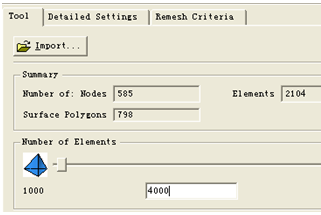
 ,然后进入新的窗口,点击
 。可以找到最后一项,Mesh Density Windows,拉动滑块,修改其参数(但是修改多少,这里我也不清楚,不过只要你修改一点,Mesh Window就会变成黑色可选),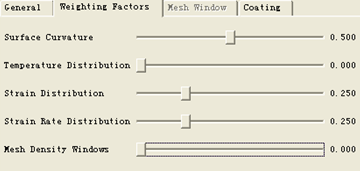
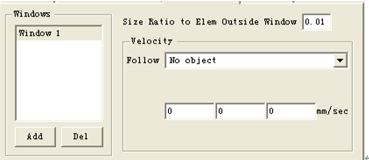
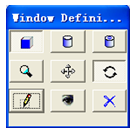 。
。  退回到网格产生界面,选择生成网格
  。
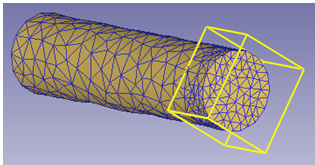
。
 ,修改
,修改 中的Mesh Density Windows,将其值拖动到0.5(这里也没有什么根据不必效仿)。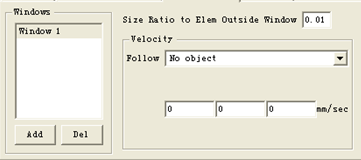
 回到网格产生界面,再次点击
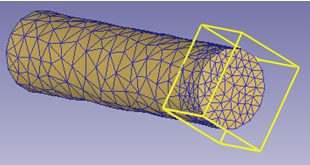
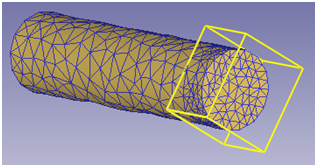
 ,产生网格,效果如下图所示。